Advanced Helpdesk - Schedule of Rates
If a Schedule of Rates is being used for financial calculations and invoicing , the required number of Schedule of Rate Items must be added to the Task.
Available from 6.0.1.0
The Schedule Of Rates sub navigation will be hidden if the current Task's Contract has no Schedule Of Rate Items defined with a non-Historic status.
Task Management > Advanced Helpdesk - Schedule of Rates
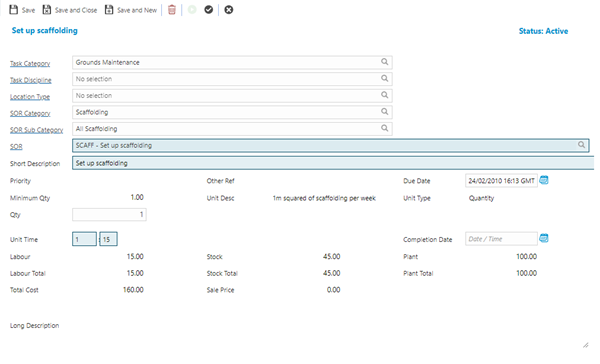
The link will open the Task / Schedule of Rates grid. It is a grid view which can be searched, sorted and customised as normal.
To add a new Schedule of Rates click New  , to edit an existing Schedule of Rates click Edit
  . A pop up window will appear which will allow the creation or amendment of a Task Schedule of Rates.
 Click to view - Schedule of Rates Fields and Descriptions
| Field Name | Description |
|---|---|
| Task Category |
When a Task Category value is selected it will filter the SOR field to show matching records. This filter works in conjunction with the other filter fields on the page. Available from 6.0.1.0 Depending on the values defined in the Schedule Of Rates Preferences for the Task Category Filter, this field may be hidden and no filter applied or displayed and possibly auto-populated with the Task's Category, this can be manually altered if required. Available from 5.8.1.0 The field label is a hyperlink to open the populated record directly. |
| Task Discipline |
When a Task Discipline value is selected it will filter the SOR field to show matching records. This filter works in conjunction with the other filter fields on the page. Available from 6.0.1.0 Depending on the values defined in the Schedule Of Rates Preferences for the Task Discipline Filter, this field may be hidden and no filter applied or displayed and possibly auto-populated with the Task's Discipline, this can be manually altered if required. Available from 5.8.1.0 The field label is a hyperlink to open the populated record directly. |
| Location Type |
When a Location Type value is selected it will filter the SOR field to show matching records. This filter works in conjunction with the other filter fields on the page. Available from 6.0.1.0 Depending on the values defined in the Schedule Of Rates Preferences for the Task Location Type Filter, this field may be hidden and no filter applied or displayed and possibly auto-populated with the Location Type associated with the Task's Location, this can be manually altered if required. Available from 5.8.1.0 The field label is a hyperlink to open the populated record directly. |
| SOR Category |
When a Schedule Of Rates Category value is selected it will filter the SOR field to show matching records. This filter works in conjunction with the other filter fields on the page. Available from 5.8.1.0 The field label is a hyperlink to open the populated record directly. |
| SOR Sub Category |
When a Schedule Of Rates Sub Category value is selected it will filter the SOR field to show matching records. This filter works in conjunction with the other filter fields on the page. Available from 5.8.1.0 The field label is a hyperlink to open the populated record directly. Note: Where the Unit Type is Required / Not Required, a tick box will be displayed. It will be ticked by default.
|
| SOR |
From the drop down select the Schedule of Rates - for more information see Schedule Of Rates Master Groups. Available from 5.8.1.0 Schedule Of Rate records with a status of Suspended or History will not be shown in the drop down. The field label is a hyperlink to open the populated record directly. |
| Short Description | Auto-populated from the selection of the SOR, this can be manually altered if required. |
| Priority | Read only field that is auto-populated from the selected SOR. |
| Other Ref |
Available from 5.8.1.0 Read only field that is auto-populated from the selected SOR. |
| Due Date | The date the selected SOR. is due. |
| Minimum Qty |
Available from 5.8.1.0 Read only field that is auto-populated from the selected SOR. |
| Unit Desc | Read only field that is auto-populated from the selected SOR. |
| Unit Type |
Read only field that is auto-populated from the selected SOR, possible values as follows:
|
| Unit data entry fields |
Dependant on the Unit Type of the selected SOR, data entry boxes will appear to allow the relevant Unit values to be added e.g. if the Unit Type has been set to squared meterage, the necessary fields will appear, if the Unit Type has been set to decimal a number box will appear. Note: Where the Unit Type is Required / Not Required, a tick box will be displayed. It will be ticked by default.
|
| Unit Time |
Auto-populated from the selected SOR, this can be manually altered if required. |
| Completion Date | The date the selected SOR is completed. |
| Labour |
Calculated field based on the Quantity x the Labour Cost of the selected SOR. |
| Stock |
Calculated field based on the Quantity x the Stock Cost of the selected SOR. |
| Plant |
Calculated field based on the Quantity x the Plant Cost of the selected SOR. |
| Labour Total |
Read only calculated field based upon the Unit Qty, Unit Type and Unit values. |
| Stock Total |
Read only calculated field based upon the Unit Qty, Unit Type and Unit values. |
| Plant Total |
Read only calculated field based upon the Unit Qty, Unit Type and Unit values. |
| Total Cost |
Read only calculated field based upon the Labour Total, Stock Total and Plant Total values. |
| Sale Price |
Available from 5.8.1.0 Read only field auto-populated from the selected SOR. |
| Long Description |
Read only field auto-populated from the selected SOR. |
Complete the fields and click Save and Close  . If additional SORs need to be added repeat the process until all costs have been recorded.