Task Requests
Available from 5.5.0.0
Appointment Requests can originate from MRI Evolution as well as integrated systems.
Appointment Request details are agreed with an end customer:
- Day and Session Preferences
- Communication Preferences
- Agree Appointment Attendance Windows
Automated communications sent to the end customer, including progress updates, can be configured to meet user's requirements.
Task Management > Task Appointments > Time Records or hyperlink enabled fields in various places
The link will open the Task Requests page.
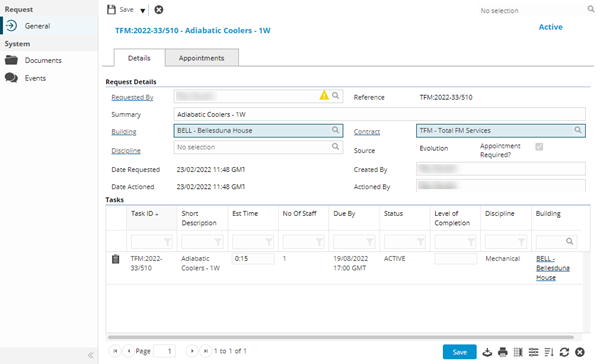
Task Request- Details Tab
 Click to view more detail
Task Request - Appointments Tab
Click to view more detail
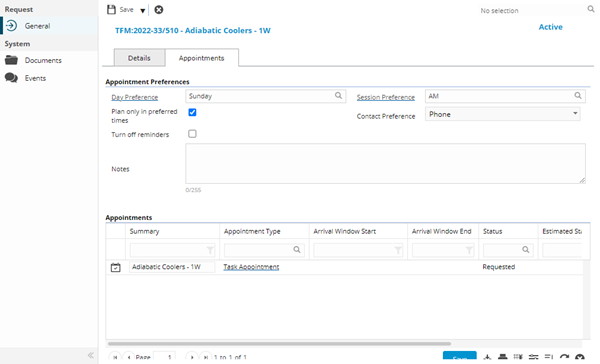
Note: If the Appointment Required? = False the Appointment Tab of the Request input panel will be hidden.
| Field Name | Description |
|---|---|
| Appointment Preferences | |
| Day Preference | Autocomplete field containing Calendar Days records where Use for Appointments = True |
| Session Preference |
Autocomplete field containing Calendar Session records where Use for Appointments = True If a Value has been selected for Day Preference field, this field will be filtered to show values linked to the selected Calendar Day record |
| Plan only in preferred times | Check box to ensure the Request must occur during the defined preferred Calender Day and Calendar Session |
| Contact Preference | Multi-select dropdown containing the communication methods set for the Appointment, these can be updated here |
| Turn off reminders | Check box to disable reminders related to the Request |
| Notes | Free type field to enter details pertinent to the Appointment. |
| Appointments | |
| Appointments grid | Filtered list of Appointment Visits related to the current Request |
Complete the fields and click Save .
.
Note: On save of a new Request the system will create a new Appointment Visit linked to the current Request, if the Contract linked to the Request has Appointments enabled