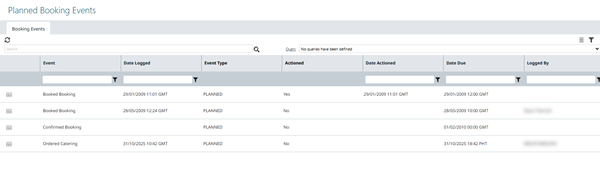
Planned Booking Events
Planned Booking Events are forward‑scheduled activity placeholders that you add against a Facilities Booking to make sure all supporting actions for the Facilities Booking happen on time. They appear in this grid once created; the Facilities Booking record itself continues to hold the core location, resource and timing details for the main Facilities Booking.
Only Planned Booking Events whose Event Type is classified as Planned are displayed here. Planned Booking Events of type Actual (the real occurrence / completion record) are intentionally excluded so this view stays focused on preparation and follow-up work.
Typical uses:
- Set up the room before a meeting (layout, equipment, AV check).
- Deliver refreshments at defined times.
- Clean / reset the room when the Facilities Booking ends.
- Prepare special materials or signage ahead of an event.
- Coordinate equipment drop‑off / collection related to the Facilities Booking.
Key behaviours:
- Created from the Facilities Booking form (or a related workflow); becomes visible here immediately after saving.
- Open from this grid to reschedule, update progress/status, change assigned resource or cancel.
Modules > Facilities Bookings > Planned Booking Events
The link will open the Planned Booking Events view only grid. It is a grid view which can be searched, sorted and customised as normal.