Project Move Tasks
Project task type supporting asset and contact relocations between locations. Move Tasks coordinate location transfers, update related data automatically, and provide audit trails through Move Assets and Move Contacts sub-navigations available after setting Task Type to Move Task.
Modules > Projects > Projects > Project Move Tasks
The link will open the Tasks Groups / Project Task grid. It is a grid view that can be customised and sorted as normal.
To add a new Project Task click New  , to edit an existing Project Task click Edit
  . A pop up window will appear which will allow the creation or amendment of a Project Task.
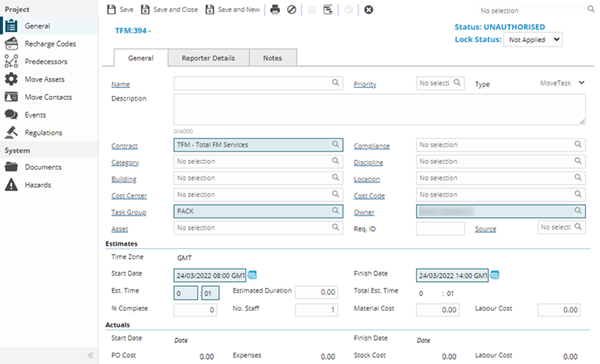
To make the Task a Move Task the Type must be set to Move Task. Upon Save additional sub navigations will be come available. These include:
- Move Assets
- Move Contacts
Move Assets
 Click to view more detail.
Move Asset Tasks will allow Assets to be easily moved from one Location to another.
Modules > Projects > Projects > Project Move Tasks
Click to view - Move Asset Fields and Descriptions
Complete the fields and click Save  . Once the Asset Move header has been completed and saved an icon will appear to allow the Assets to be moved. To move the Assets click Move Assets
  .
.
Move Contacts
Click to view more detail.
Move Contact Tasks will allow Contacts to be easily moved from one Location to another.
Modules > Projects > Projects > Project Move Tasks
Click to view - Move Contacts Fields and Descriptions
Complete the fields and click Save . Once the Contact Move header has been completed and saved an icon will appear to allow the Contacts to be moved. To move the Contacts click Move Contacts  .
.
If labels have been requested they can be printed by clicking Print Labels  .
.