Sales Invoice Batches
Sales Invoice Batches help you manage and review groups of invoices generated together. The system supports batch validation, error checking, and approval, ensuring accurate billing and compliance. Use this feature to analyse invoice batches, verify details, and maintain a clear audit trail.
Business Value: Reduces billing errors, improves cash flow, and supports accurate, compliant invoicing processes.
Modules > Sales Invoicing > Sales Invoice Batches
The link will open the Sales Invoice Batches grid. It is a grid view which can be searched, sorted and customised as normal.
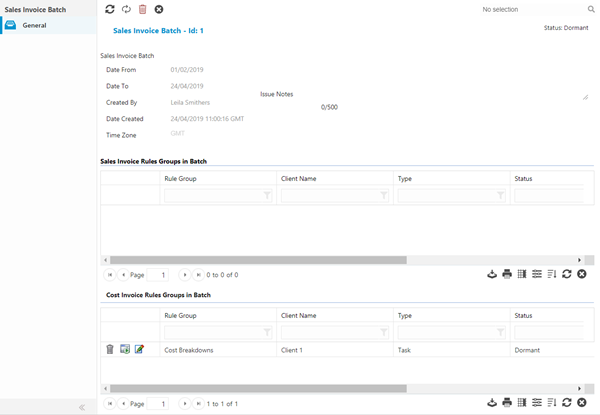
Opening a batch will allow a User to view the details of invoices created from the Batch Generation.
The upper section of the page describes the details of the batch itself. The lower part of the page lists the rule groups used to generate the batch
Available from 4.5.1
Sales Invoice and Cost Invoice Rule Groups can be seen in their own grid.
Additional Icons
| Icon | Feature | Description |
|---|---|---|

|
Delete Batch | Deletes the Sales Invoice batch - this can only be done if all invoices are still in a draft status. |

|
Regenerate Dormant Rule groups | Regenerate the rules group and the associated entities to update values and costs. |

|
Edit Batch | Clicking will open the batch and allow the view and edit of all generated invoices - any Tasks that have been invoiced in the batch can also be viewed from the sub navigation Tasks in Batch. |