Sales Invoice Contract Schedules
Contract Invoice Schedules in MRI Evolution allow you to define when and how much to invoice for each contract, supporting both one-off and recurring billing scenarios. Setting up a Contract Invoice Schedule ensures that invoices are generated accurately and on time, improving cash flow and contract compliance. Users can create, edit, or review schedules to match business agreements and automate the invoicing process. To manage Contract Invoice Schedules, use the Contracts Invoice grid and select the appropriate options for your contract requirements.
Facilities > Contracts > Sales Invoice Contract Schedules
The link will open the Contracts Invoice grid. It is a grid view which can be searched, sorted and customised as normal.
To create a Contract Invoice Schedule select sub navigation Contract Invoices.
To add a new Contract Invoice click New  , to edit an existing Contract click Edit
  . A pop up window will appear which will allow the creation or amendment of a Contract Invoice.
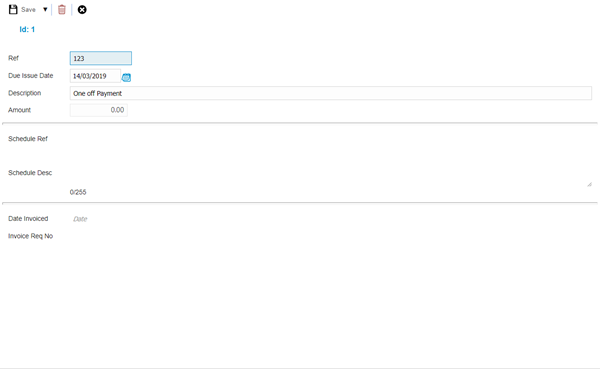
 Click to view - Contract Invoice Fields and Descriptions
Complete the fields and click Save and Close  .
.
Contract Invoice Schedule
Click to view more detail
Contract invoices can be created on mass. This enables a User to create regular contract schedules for invoicing.
Facilities > Contracts > Sales Invoice Contract Schedules
The link will open the Contract Invoice grid. It is a grid view that can be customised and sorted as normal.
To create a Contract invoice schedule click Open Contract Invoice Schedule  . A pop up window will appear which will allow the creation or amendment of a Contract Invoice Schedule.
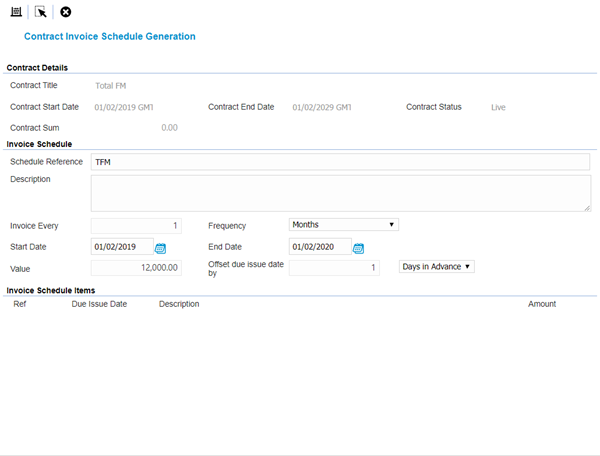
Click to view Contract Invoice Schedule Fields and Descriptions
Once the Header has been created the schedule can be checked before it is generated. Click Generate Schedule .
MRI Evolution will then generate the Contract schedule, the invoice amounts are calculated by the value of the contract (from the schedule) spilt equally over the period of time according to the frequency’s.
Ref's, Due Issue Dates, Descriptions and Amounts can be manually altered if required.
Once amendments have been made the Contract invoice schedule can be generated, click Confirm schedule and close page .
.
The Contract invoice schedule is auto-created. Invoices can now be generated using a Contract based Sales Invoicing Rule Group