Costs Invoice
Costs Invoice is part of the Sales Invoicing module in MRI Evolution and is used to document and manage the costs associated with client billing. This page provides access to the Costs Invoice grid, where you can search, sort, and review all cost invoices linked to sales invoices and contracts.
- Business Value: Ensures accurate, transparent billing and financial reporting by capturing all costs related to services rendered. Integrates with contracts and sales invoices for end-to-end financial management.
- Actionable Guidance: To create or review a costs invoice, open the Costs Invoice page from the Sales Invoicing module, enter or verify the relevant cost details, and link them to the appropriate sales invoice or contract. Use the grid to manage and track invoice status from draft to approval.
- Practical Example: After completing a service, generate a costs invoice to ensure all expenses are captured and billed to the client. Approved invoices are locked for audit and compliance.
- Tip: Regularly reconcile costs invoices with sales invoices and contract records to maintain accurate financial data across the system.
Modules > Sales Invoicing > Costs Invoice
The link will open the Cost Invoices grid. It is a grid view which can be searched, sorted and customised as normal.
To edit an existing Cost Invoice click Edit  . A pop up window will appear which will allow the amendment of a Cost Invoice.
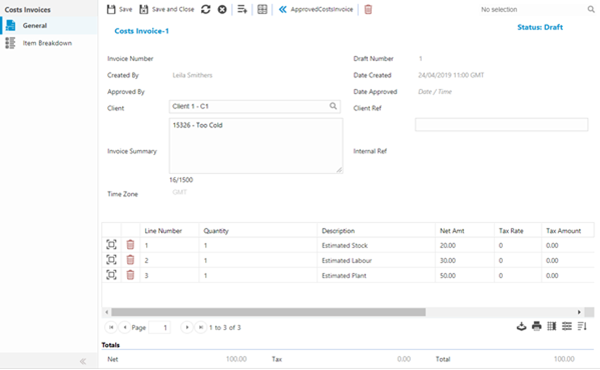
A Cost Invoice Header is auto-generated when the invoice is created using the information collated by the Rule Group.
The status of a cost Invoice when first generated is always DRAFT. Once the invoice has been checked it can be moved to the Status of APPROVED.
Once a Cost Invoice has been Approved it cannot be brought back to Draft status.
 Click to view - Cost Invoice Fields and Descriptions
Reviewing Line Items
Click to view more detail
Line items show the values that have been generated for Cost Invoice, they can be opened, checked and amended. New line items can also be added an existing line items can be deleted if required.
Line item descriptions and costs are generated according to the rule group used to generate the invoice. These can be manually altered if required.
Modules > Sales Invoicing > Costs Invoice
To edit an existing Line Item click Edit . A pop up window will appear which will allow the creation or amendment of a Line Item.
Click to view - Cost Invoice Line Item Fields and Descriptions
Item Breakdown
Click to view more detail
Item Breakdown allows the analysis of where in MRI Evolution the individual Line Item has generated its cost.
Modules > Sales Invoicing > Costs Invoice
The link will open the Cost Invoice / Item Breakdown grids. It is a two grid view, both grids can be sorted and customised as normal.
The top grid shows the line detail and summary information, the bottom grid shows the breakdown of the items included in the Cost Invoice
Clicking the check box Show Breakdowns for all line items will show the details breakdown of how the invoice costs were generated.
Cost Invoice Additional Icons
| Icon | Feature | Description |
|---|---|---|

|
Add Line item | Adds an additional line item to the invoice. |

|
Approve Invoice | Approves the Cost invoice. |

|
Delete | Deletes the Cost Invoice- this can only be done in draft status. |

|
View Source | Clicking this icon from a line item will hyper-link the User to the base Task |
|
|
Link Object to invoice line item | If raising a manual Line Item the User may wish to link the line item back to a system entity. From the line item click the icon from the drop down select the item to link. Check Deduct value from future auto-generated invoices if the line item amount is to be deducted from future generated invoices. |