Task WIP Grid
The Task WIP Grid provides a comprehensive overview of all Tasks with Work In Progress (WIP) cost breakdowns, enabling users to monitor and manage ongoing work and associated costs in detail.
By default, the grid displays WIP-related data, but you can toggle to show Task-related data as needed. This flexibility helps users track both financial and operational progress across tasks.
Modules > WIP > Task WIP Grid
The link will open the Task WIP Grid. It is a grid view which can be searched, sorted and customised as normal.
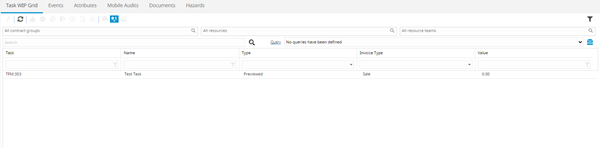
To toggle between Task Grid and Task WIP Grid click Toggle Grid  .
.
Once in the WIP Task Grid, WIP Reports can be run .Running Totals can also be seen in the bottom right corner of the grid.
Highlight the required Task and click WIP Report  . MRI Evolution will run the Task Advanced Finance Summary report (WIP -001)
To print WIP reports the Task WIP grid must be toggled to Tasks
WIP Tasks (in Draft Status) can be regenerated from this grid. Highlight the required Tasks and click Regenerate Task Cost Type Breakdowns  .
.
A pop up window will appear with the highlighted Tasks in the top pane and the available WIP Templates in the bottom pane. Highlight the required Tasks and the required WIP template click Regenerate Task Cost Type Breakdowns .
A WIP Task Cost Summary by Contract report can be printed from Modules > Concept Reports > (Name) WIP-002 WIP (Description) Task Cost Summary by Contract