MRI Dreamscape Users & Groups
Available from 5.3.0.0
The MRI Dreamscape Users & Groups section allows you to add, view, and manage users and groups for your Dreamscape applications. This central management ensures secure access, proper user assignment, and streamlined administration for all Dreamscape-enabled features.
To add or update users, use the provided forms and validation rules.
Action: Add or edit users and groups as needed to maintain accurate access control. Review validation rules and update user details to reflect organizational changes.
 Available from 7.0.0.0
Recent updates have removed the requirement for Social Name and its uniqueness for Sub Tenants, simplifying user management.
Settings > MRI Dreamscape Settings > MRI Dreamscape Users & Groups
The link will open the MRI Dreamscape Users & Groups grid. It is a grid view which can be searched, sorted and customised as normal.
To add a new MRI Dreamscape User click New  , to edit an existing MRI Dreamscape User click Edit
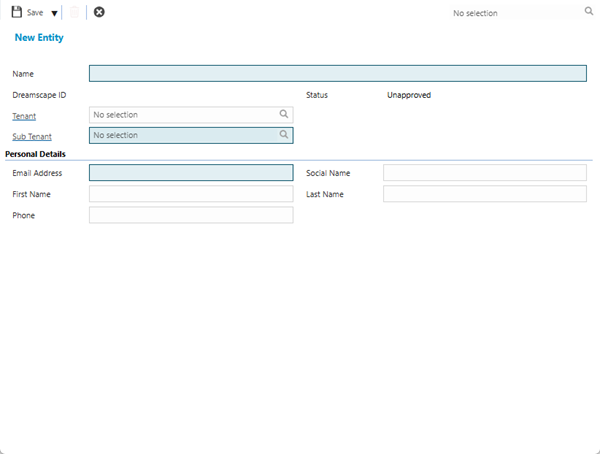
  . A pop up window will appear which will allow the creation or amendment of a MRI Dreamscape User.
 Click to view - MRI Dreamscape User Fields and Descriptions
Complete the fields and click Save . Once the MRI Dreamscape User header has been completed and saved a sub navigation will appear to allow additional entities to be created / assigned.
These include:
- MRI Dreamscape Publishing
MRI Dreamscape Publishing
Click to view more detail
MRI Dreamscape publishing allows Applications, Tenants and Sub Tenants to be published to individual Users
Settings > MRI Dreamscape Settings > MRI Dreamscape Users & Groups - MRI Dreamscape Publishing
The link will open the MRI Dreamscape Publishing grid. It is a grid view that can be customised and sorted as normal.
To assign Applications click Assign to Applications  , Applications in the right hand assignment window are connected.
To assign Tenants click Assign to Tenants , Tenants in the right hand assignment window are connected.
To assign Applications click Assign to Sub Tenants  , Sub Tenants in the right hand assignment window are connected.