Event Matrix
Available from 4.3.2.0
The Event Matrix controls which follow-on (child) events display when users log events. Define which events are always available, start sequences, or follow other events, ensuring users see only relevant next steps.
Settings > Event Settings > Event Matrix
The link will open the Event Matrix grid. It is a grid view which can be searched, sorted and customised as normal.
To add a new Event Matrix click New  , to edit an existing Event Matrix click Edit
  . A pop up window will appear which will allow the creation or amendment of a Event Matrix.
 Click to view Event Matrix Fields and Descriptions
Complete the fields and click Save  . Once the Event Matrix header has been completed and saved a sub navigation will appear to allow additional entities to be created.
These include:
- Event Matrix
Event Matrix
Click to view more detail.
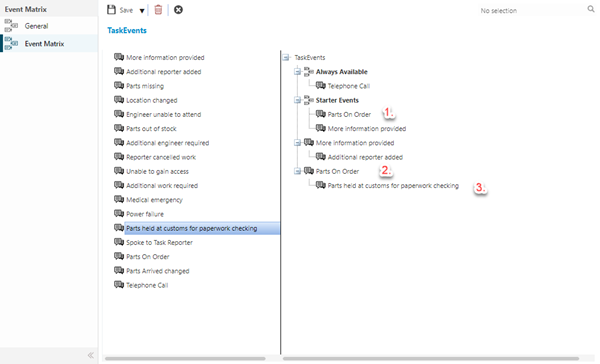
All Events are viewable on the left window of the Event Matrix window, these can be dragged into the right hand window creating the Event Matrix.
- Events that are dragged under Always Available will always be available to apply.
- Events that are dragged under Starter Events can then be used to create matrix’s. (1.)
- Once an Event has been dragged under the Starter Event it must be re-dragged into the matrix underneath Starter Events to begin creating the Event Matrix(2.) , Child Events can then be applied (3.)
Example: The above example would work as follows:
The Always Available Events of "Telephone Call" can always be applied,
If the User picks the Starter Event of "Parts on Order" , when they add the next new Event "Parts delivered" will become available.
For Event Matrix to become available they must be activated against either the Contract, Instruction Set or Facilities Booking Preference.