Notifications
Available from 4.5.3.0
Evolution Go Notifications enable real-time communication between central Evolution systems and field-based mobile users, delivering critical operational updates, announcements, and alerts directly to technician devices (for example, "Building A boiler system emergency—all HVAC techs report status", "System maintenance scheduled 2-4 pm today", "New safety procedure effective immediately"). Create a notification by clicking New, selecting recipient mobile users or groups (online users appear in bold), entering a subject and message text, setting priority level (Low, Medium, High, Critical), and defining start/end date-time windows when the message should be available. Messages only reach users who sync their devices during the active time window—critical for time-sensitive communications like emergency procedures or weather-related site closures. Track delivery status in the grid to verify messages were sent and confirm receipt. Use notifications for operational coordination (for example, notifying all technicians about changed dispatch priorities), safety alerts (for example, hazardous material spill in Building C), system announcements (for example, new mobile app version available), and urgent task assignments that require immediate attention beyond standard task notifications. This ensures field teams stay informed and responsive without requiring phone calls or manual coordination.
Settings > Evolution Go > Notifications
The link will open the Notifications grid. It is a grid view which can be searched, sorted and customised as normal.
To add a new Notification click New  , to edit an existing Notification click Edit
  . A pop up window will appear which will allow the creation or amendment of a Notification.
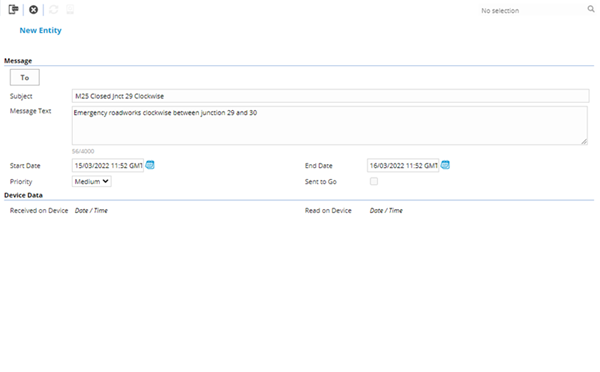
 Click to view Send Evolution Go Notification Fields and Descriptions
Additional Icons
| Icon | Feature | Description |
|---|---|---|

|
Send Evolution Go Notification |
Available from 4.5.3.0 Click to send the Notification |

|
Get Device Data |
Available from 4.5.3.0 Click to get the device data with regards to the Notification |