Colouring Sets
The Colouring Sets feature in MRI Evolution allows users to assign colour schemes to bookings in the Planner, enhancing visual clarity and making it easier to interpret booking information at a glance.
Colouring sets can be assigned to:
- Booking Status
- Department
- Booking Type
- Course
- Booking Item Status
Administrators can manage the list of Colouring Sets here, ensuring that users have the visual tools needed to quickly understand and manage bookings.
Settings > Facilities Booking > Colouring Sets
The link will open the Colouring Set grid. It is a grid view which can be searched, sorted and customised as normal.
To add a new Colouring Set click New  , to edit an existing Colouring Set click Edit
  . A pop up window will appear which will allow the creation or amendment of a Colouring Set.
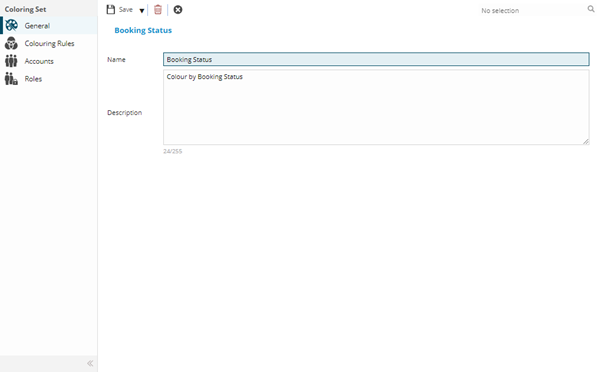
 Click to view - Colouring Sets Fields and Descriptions
Complete the fields and click Save  . Once the Colouring Set header has been completed and saved a sub navigation will appear to allow additional entities to be assigned.
These include:
- Colouring Rules
- Accounts
- Roles
Colouring Rules Sub Navigation
Click to view more detail.
Colouring Rules sets what value within a booking will dedicate the colouration of the booking in the Planner.
Settings > Facilities Booking > Colouring Sets
From the drop down select the Type. The relevant Types must then be assigned to the Colour Set.
To assign Types click Assign  , entities in the right hand assignment window are connected.
The Type values must then be assigned a Colour.
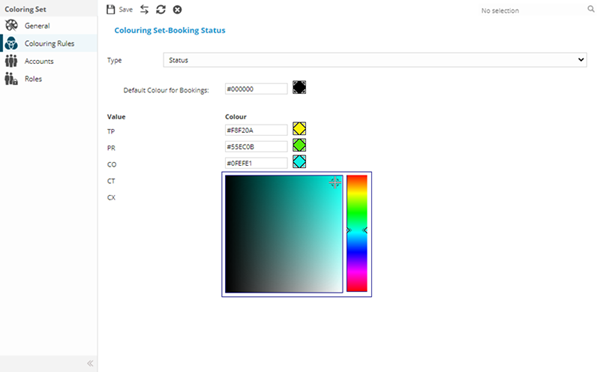
Colours can be entered as HTML colour codes, or selected using a graphical colour selector next to each value. All values must be assigned a colour or they will return the default black in the Resource Planner.
Colour the values and click Save .
Accounts Sub Navigation
Click to view more detail.
For a User to be able to use a Colouring Set it must be assigned to either there User Account or Role.
Settings > Facilities Booking > Colouring Sets
To assign Accounts click Assign , entities in the right hand assignment window are connected.
Roles Sub Navigation
Click to view more detail.
For a User to be able to use a Colouring Set it must be assigned to either there User Account or Role.
Settings > Facilities Booking > Colouring Sets
To assign Roles click Assign , entities in the right hand assignment window are connected.