IFS 360 Preferences
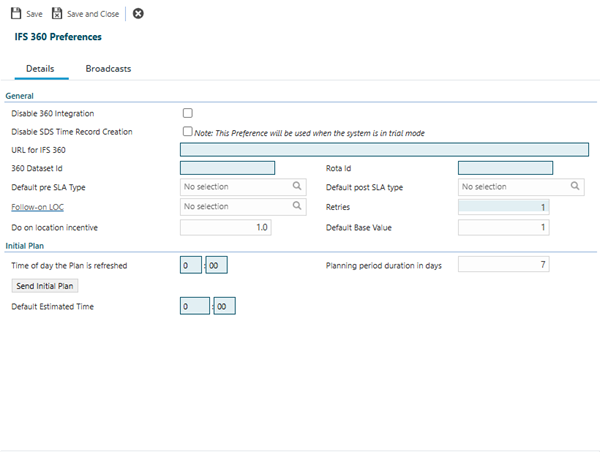
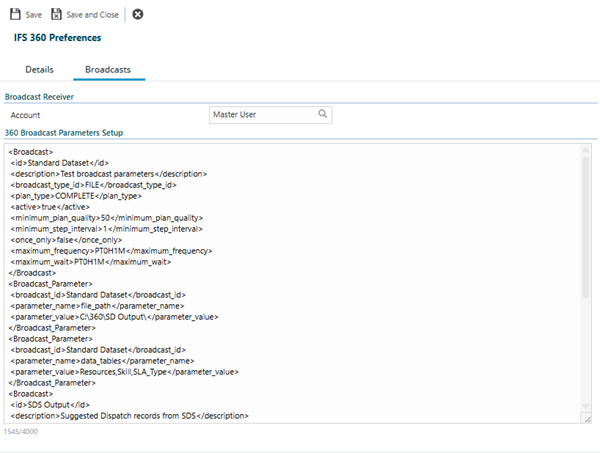
IFS 360 Preferences configure the integration between MRI Evolution and the IFS 360 Scheduling system, controlling how Evolution sends task data to IFS 360 for automated scheduling and optimization, then receives back optimized schedules. Configure mandatory connection details (URL for IFS 360, 360 Dataset Id, Rota Id) to establish the integration link, set SLA types (Default pre SLA Type, Default post SLA type) to control timing calculations, and specify planning parameters (Planning period duration in days, Time of day the Plan is refreshed, Default Estimated Time) to control schedule generation. The Broadcasts tab configures how scheduling data is transmitted to IFS 360—define broadcast configurations specifying output format (for example, FILE), plan type (COMPLETE for full dataset, CHANGE for incremental updates), quality thresholds (Minimum Plan Quality), and broadcast parameters (file paths, data tables to include). When active, the integration automatically sends Evolution task data to IFS 360 at configured intervals, IFS 360 optimizes the schedule based on resource availability and constraints, then returns suggested appointments to Evolution for technician assignment. This enables intelligent resource scheduling (optimize technician routes and workload), supports complex planning scenarios (multi-day planning periods with constraint optimization), and maintains schedule quality (minimum quality thresholds before accepting plans).
Settings > Integrations > IFS 360 Preferences
 Click to view - Details Tab Fields and Descriptions
Click to view - Broadcasts Tab Fields and Descriptions
| Field Name | Description |
|---|---|
| 360 Broadcast Parameters Setup | |
| Broadcast Id | The unique identifier for the broadcast configuration (e.g., Standard Dataset). |
| Description | Text description of the broadcast parameters or purpose. |
| Broadcast Type Id | The type of broadcast (e.g., FILE). |
| Plan Type | The plan type for the broadcast (e.g., COMPLETE). |
| Active | Indicates if the broadcast is active (true or false). |
| Minimum Plan Quality | The minimum plan quality required for the broadcast (e.g., 50). |
| Minimum Step Interval | The minimum step interval for the plan (e.g., 1). |
| Once Only | Indicates if the broadcast should run only once (true or false). |
| Maximum Frequency | The maximum frequency for the broadcast (e.g., P10TH1M). |
| Maximum Wait | The maximum wait time for the broadcast (e.g., P10TH1M). |
| Broadcast Parameters | |
| Parameter Name | The name of the parameter for the broadcast (e.g., file_path, data_tables). |
| Parameter Value | The value assigned to the parameter (e.g., C:\SDS\Output, Resources,SKIL,SLA_Type). |
| Example Output | |
    <Broadcast>
        <id>Standard Dataset</id>
        <description>Test broadcast parameters</description>
        <broadcast_type_id>FILE</broadcast_type_id>
        <plan_type>COMPLETE</plan_type>
        <active>true</active>
        <minimum_plan_quality>50</minimum_plan_quality>
        <minimum_step_interval>1</minimum_step_interval>
        <once_only>false</once_only>
        <maximum_frequency>P10TH1M</maximum_frequency>
        <maximum_wait>P10TH1M</maximum_wait>
    </Broadcast>
    <Broadcast_Parameter>
        <broadcast_id>Standard Dataset</broadcast_id>
        <parameter_name>file_path</parameter_name>
        <parameter_value>C:\SDS\Output</parameter_value>
    </Broadcast_Parameter>
    <Broadcast_Parameter>
        <broadcast_id>Standard Dataset</broadcast_id>
        <parameter_name>data_tables</parameter_name>
        <parameter_value>Resources,SKIL,SLA_Type</parameter_value>
    </Broadcast_Parameter>

    <Broadcast>
        <id>SDS Output</id>
        <description>Suggested Dispatch records from SDS</description>
        <broadcast_type_id>FILE</broadcast_type_id>
        <allocation_type>8</allocation_type>
        <plan_type>CHANGE</plan_type>
        <active>true</active>
        <minimum_plan_quality>50</minimum_plan_quality>
        <minimum_step_interval>1</minimum_step_interval>
        <once_only>false</once_only>
        <maximum_frequency>P10TH1M</maximum_frequency>
        <maximum_wait>P10TH1M</maximum_wait>
    </Broadcast>
    <Broadcast_Parameter>
        <broadcast_id>SDS Output</broadcast_id>
        <parameter_name>file_path</parameter_name>
        <parameter_value>C:\SDS\Output</parameter_value>
    </Broadcast_Parameter>
    <Broadcast_Parameter>
        <broadcast_id>SDS Output</broadcast_id>
        <parameter_name>plan_filter</parameter_name>
        <parameter_value></parameter_value>
    </Broadcast_Parameter>
|
|
Complete the required fields and click Save  . Once saved, the IFS 360 integration will use these preferences for all scheduling and planning operations.