PMS Task Queries
Available from 4.4.1.0
PMS Task Queries identify which Tasks should be included in Performance Measurement System (PMS) calculations for Batch Runs and Ratchets. Build queries using the standard query designer, filtering Tasks by attributes like Location, Task Category, or Date Range.
When creating a Batch Run query, include the {PMS Batch Start Date} and {PMS Batch End Date} parameters to automatically filter Tasks within each calculation period. Test queries directly from this screen to verify they return the correct Task data before running PMS calculations.
Settings > Payment Mechanisms > PMS Task Queries
The link will open the PMS Task Queries grid. It is a grid view which can be searched, sorted and customised as normal.
To add a new PMS Task Query click New  , to edit an existing PMS Task Query click Edit
  . A pop up window will appear which will allow the creation or amendment of a PMS Task Query.
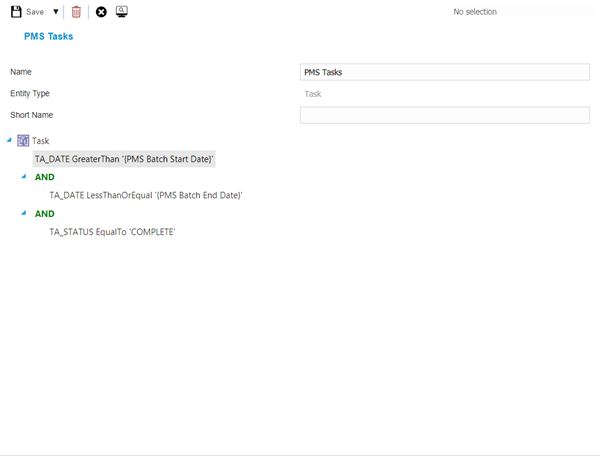
PMS Task Queries allow the User to test the query once it has been built from the query itself, this is to ensure it is pulling the correct PMS data.
From the PMS Test Query select Test Query  , a pop up Task Grid will appear to allow data interrogation.
For more information on queries see Queries.
PayMech Module results are calculated using Workflow. Unless the calculation workflows are amended, changing settings in MRI Evolution may have no effect on PayMech outputs and results .