Service Payments
Available from 4.4.1.0
Service Payments define standard annual and monthly payment amounts (for example, £48,000 annual service charge, £12,000 quarterly instalments) bound to Payment Mechanism Contracts. Create the Service Payment header with a code and name (for example, "Annual Maintenance 2024"), add annual payment values specifying the total amount and year, then break them down into monthly or quarterly instalments to match your billing cycles (for example, twelve monthly payments of £4,000 each April through March). Link Service Payments to Payment Mechanism Contracts so the system automatically generates invoices based on the defined schedule, ensuring tenants and service recipients receive consistent, predictable bills. This streamlines recurring billing, reduces manual invoice creation, and maintains accurate financial records for service charges and maintenance agreements.
Settings > Payment Mechanisms > PMS Service Payments
The link will open the Service Payments grid. It is a grid view which can be searched, sorted and customised as normal.
To add a new Service Payment click New  , to edit an existing Service Payment click Edit
  . A pop up window will appear which will allow the creation or amendment of a Service Payment.
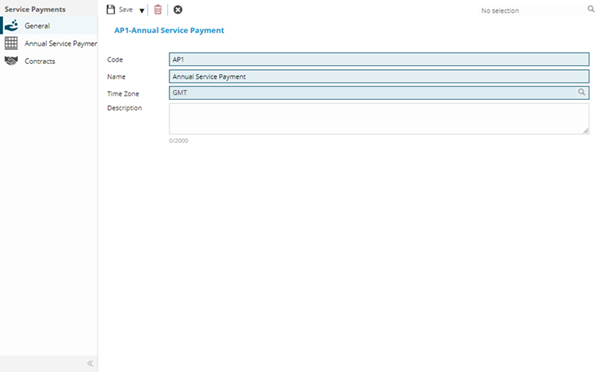
 Click to view - Service Payments Fields and Descriptions
Complete the fields and click Save  . Once the Service Payment header has been completed and saved a sub navigation will appear to allow additional entities to be assigned / created.
These include:
- Annual Service Payments
- Contracts
Annual Service Payments Sub Navigation
Click to view more detail.
Having created the Service Payment Header, the Annual Service Payment can be created.
Settings > Payment Mechanisms > PMS Service Payments
The link will open the Annual Service Payments grid. It is a grid view that can be customised and sorted as normal.
To add a new Annual Service Payment click New , to edit an existing Annual Service Payment click Edit . A pop up window will appear which will allow the creation or amendment of a Annual Service Payment.
Click to view - Annual Service Payments Fields and Descriptions
Monthly Service Payments
Click to view more detail.
Having created the Annual Service Payment Header, the Monthly Service Payment can be created.
Settings > Payment Mechanisms > PMS Service Payments
From the Annual Service Payment click either:
- Generate Proportional Monthly Payments
 generates a monthly payment that takes into account the amount of days in the month.
 - Generate equal Monthly Payments
 generates an equal payment for each month of the year.
Click Save . Once the Monthly Service Payments has been completed and saved a sub navigation of Monthly Service Payments will appear to allow the monthly payments to be viewed.
Contracts Sub Navigation
Click to view more detail.
Service payments are assigned to Contracts.
Settings > Payment Mechanisms > PMS Service Payments
The link will open the Service Payments / Contracts grid. It is a grid view that can be customised and sorted as normal.
To assign Contracts click Assign  , entities in the right hand assignment window are connected.
PayMech Module results are calculated using Workflow. Unless the calculation workflows are amended, changing settings in MRI Evolution may have no effect on PayMech outputs and results .