Project Authorisation Models
Project Authorisation Models define multi-level approval workflows for project activation by specifying sequential authorization stages with value-based routing rules. Create models with descriptive names, then add Authorisers specifying Account, value range (Lower Limit/Lower Operator, Upper Limit/Upper Operator), and Authorisation Level—for example, Level 1 Authorisers approve £0-£5,000 projects, Level 2 approve £5,001-£25,000, Level 3 approve £25,001-£100,000, and Level 4 approve anything above £100,000. When a Project is associated with a model, authorization requests are sent to authorizers at the appropriate level based on the project value. The first authorizer to respond at each level can either accept or reject: if they reject, the entire authorization process terminates and the project cannot proceed. If they accept, authorization requests are sent to all authorizers in the next level of the model. This process repeats through successive levels until the project either receives acceptance at all required levels (and can be activated) or receives a rejection at any level (terminating authorization). This enforces financial controls (appropriate approval levels for project values), maintains governance compliance (documented authorization trails for capital expenditure), and prevents unauthorized project activation. Organizations typically configure 3-5 authorization levels matching their delegation of authority policies and financial thresholds.
Settings > Projects > Project Authorisation Models
The link will open the Authorisation Models grid. It is a grid view which can be searched, sorted and customised as normal.
To add a new Authorisation Model click New  , to edit an existing Authorisation Model click Edit
  . A pop up window will appear which will allow the creation or amendment of a Authorisation Model.
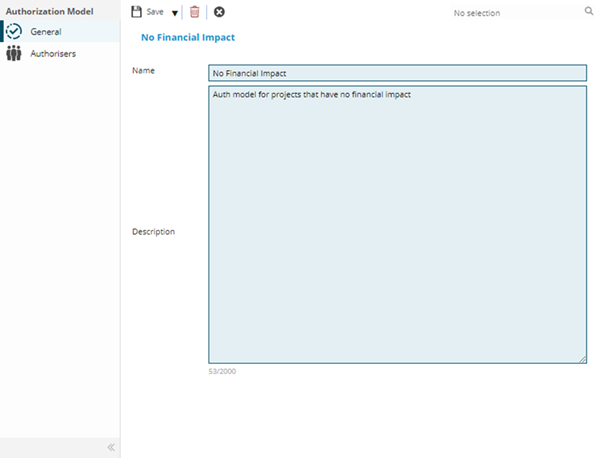
 Click to view - Authorisation Models Fields and Descriptions
Complete the fields and click Save  . Once the Authorisation Model header has been completed and saved a sub navigation will appear to allow additional entities to be a created.
These include:
- Authorisers
Authorisers
Click to view more detail.
Each User that will be able to authorise a Project raised with the model must be set a lower and upper limit and a level for authorisation.
Settings > Projects > Project Authorisation Models
The link will open the Authorisation Models / Authorisers grid. It is a grid view which can be searched, sorted and customised as normal.
To add a new Authorisers click New , to edit an existing Authorisers click Edit . A pop up window will appear which will allow the creation or amendment of an Authoriser.
Click to view - Authorisers Fields and Descriptions
Complete the fields and click Save and Close  .
.