Department Groups
Department Groups organize Department Elements into logical collections for property and estate management purposes, supporting hierarchical classification of organizational departments. Create Department Groups with unique codes, descriptions, and date ranges (Start Date to Closed Date) to categorize how departments are structured across your property portfolio—for example, create "Facilities Operations" to group maintenance-related departments, "Administrative Services" for office functions, "Residential Services" for housing management departments. Link related Department Elements to each Group to establish the organizational hierarchy. This supports departmental cost reporting (aggregate costs across all departments within a group), enables portfolio-level analysis (compare facilities spend across different Department Groups), and facilitates organizational restructuring (open new groups with Start Dates, close obsolete groups with Closed Dates when departments reorganize). Organizations typically define groups matching their financial reporting structure and operational divisions, ensuring consistent classification of departmental activities across estates.
 Available from 7.0.0.0
The Purchase Key licence dependency for this specific element of the system has been removed and is now included as standard in the core MRI Evolution product the feature has been turned on for all systems by default.
Note: Other restrictions, such as User licence type restrictions and / or any restrictions to underlying functionality that is dependent upon Purchase Key licences will remain in place.
Settings > Property & Estates > Department Groups
The link will open the Department Group Grid. It is a grid view which can be searched, sorted and customised as normal.
To add a new Department Group click New  , to edit an existing Department Groups click Edit
  .A pop up window will appear which will allow the creation or amendment of a Department Groups
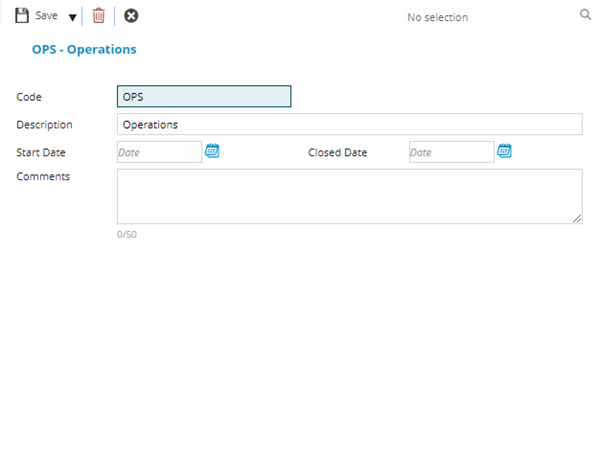
 Click to view - Department Group Fields and Description
| Field Name | Description |
|---|---|
| Code | The code of the Department Group. |
| Description | The description of the Department Group. |
| Start Date | The Start Date of the Department Group. |
| Closed Date | The closed date of the Department Group. |
| Comments | Free text comments relating to the Department Group. |
Complete the fields and click Save and Close  .
.