Servers
The Servers feature in MRI Evolution enables organizations to manage the configuration and maintenance of web servers that host the application. Typically, MRI Software and your database administrator handle the initial set-up to ensure secure and reliable operation.
Administrators can maintain the list of Servers here, supporting system performance and availability.
Settings > System Administration > Environment > Server
The link will open the Server grid. It is a grid view which can be searched, sorted and customised as normal.
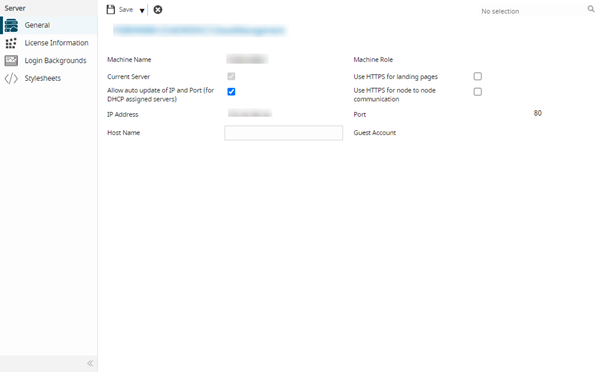
The initial server screen will be set up by MRI Software on installation, the screen displays read only information relating to the web server where MRI Evolution is installed.
Licence Information
 Click to view more detail.
The Licence Information screen shows the feature name, type and access level of MRI Evolution Licensed Features.
Settings > System Administration > Environment > Server
If a new module is purchased the Licence key can be applied here.
Login Backgrounds
Click to view more detail
Available from 5.2.0.0
Login Background images can now be uploaded within the system and configured on a per server instance basis. Documents uploaded to the server will be randomly selected as the background image.
Settings > System Administration > Environment > Server
The link will open the Server - Login Backgrounds grid. It is a grid view which can be searched, sorted and customised as normal.
To add a new Login Background click New  , To assign Login Backgrounds click Assign
  , Login Backgrounds in the right hand assignment window are connected.