Table Register
The MRI Evolution system is based on a large back end database. This database contains all the Users, Preferences and data entered.
There are a wide range of functions that can be altered within the Table Register; these include; how the text in the drop down menus is displayed or allowing hazards and documents to be associated. It is also the gateway to define compulsory or unique fields that are linked with each table.
 Available from 7.0.0.0
A vertical scroll bar has been added to the page because when a system has many modules licensed, some of the fields were not visible unless the page size was increased.
Settings > System Administration > System Appearance & Behaviour > Table Register
The link will open the Table Register grid. It is a grid view which can be searched, sorted and customised as normal.
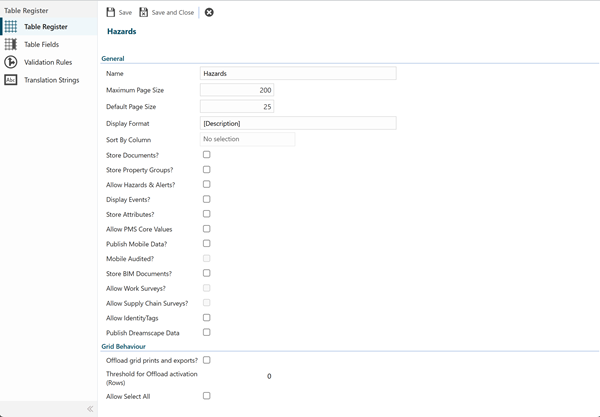
 Click to view - Table Register Fields and Descriptions
Complete the fields and click Save  . From the Table Register header a sub navigation can be accessed to allow additional features to be enabled.
These include:
- Table Fields
- Validation Rules
- Translation Strings
Table Fields
Click to view more detail.
Within the Table Register specific fields can be modified to enable certain features.
Settings > System Administration > System Appearance & Behaviour > Table Register
The link will open the Table Register / Table Fields grid. It is a grid view that can be customised and sorted as normal.
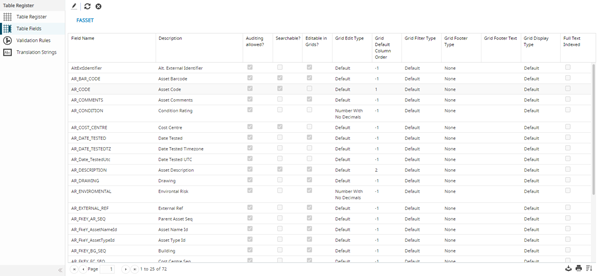
To edit a Table Field, highlight the Table Field and click Edit  .
.
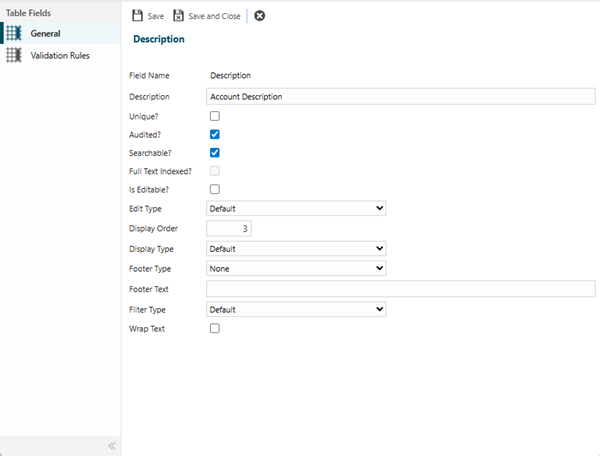
The editing and display features will vary and filter dependant on the field selected.
Validation Rules
Click to view more detail.
Rules can be created to control data as it is entered e.g. Req IDs are unique or that email addresses contain an @ symbol.
Settings > System Administration > System Appearance & Behaviour > Table Register
The link will open the Table Register / Validation Rules grid. It is a grid view which can be searched, sorted and customised as normal.
To add a new Validation Rule click New  , to edit an existing Validation Rule click Edit . A pop up window will appear which will allow the creation or amendment of a Validation Rule.
Click to view - Validation Rules Fields and Descriptions
Translation Strings
Click to view more detail.
Translation Strings are the thousands of labels from across the system. These can be altered to fit a business need.
Settings > System Administration > System Appearance & Behaviour > Table Register
Highlight the translation string to edit, click Edit . A pop up window will appear which will allow the amendment of a Translation String.