Appointment Types
Available from 5.5.0.0
Appointment Types define the configuration templates and business rules for scheduled resource visits in Evolution, controlling how appointments are created, displayed, and completed in both desktop and mobile applications (for example, Evolution Go, MRI Dreamscape Contractor). Create Appointment Types specifying key operational parameters including Maximum Duration (longest time the appointment can run, for example, 4 hours for routine maintenance visits), Sign Off Requirements (when signatures are captured: Not Required, On Departure from site, or On Completion of all work), Default Window Size (standard appointment duration, for example, 2 hours), and window adjustment rules (how appointment windows automatically resize when resources accept or are dispatched to tasks). For example, create an "Emergency Repair" appointment type with 3-hour maximum duration, signature required on completion, and automatic window adjustment on despatch (±30 minutes either side of estimated arrival to provide customer with realistic time expectations). These configuration options directly affect scheduling workflows—when users create appointments of this type, the system automatically applies these defaults and enforces these behaviours, ensuring consistent service delivery standards across all scheduled work. This supports operational efficiency (standardized appointment behaviours reduce configuration time), customer communication (clear window sizing and adjustment rules enable accurate arrival time notifications), and compliance tracking (signature requirements ensure documented service completion). Organizations typically create multiple Appointment Types matching different service scenarios—for example, Planned Maintenance (longer durations, no signature required), Customer Appointments (adjustable windows with signatures on departure), and Emergency Call-outs (flexible durations with completion signatures)—enabling appropriate workflows for each service delivery model.
 Available from 7.0.0.0
The Purchase Key licence dependency for this specific element of the system has been removed and is now included as standard in the core MRI Evolution product the feature has been turned on for all systems by default.
Note: Other restrictions, such as User licence type restrictions and / or any restrictions to underlying functionality that is dependent upon Purchase Key licences will remain in place.
Settings > Appointments & Visits > Appointment Types
The link will open the Appointment Type grid. It is a grid view which can be searched, sorted and customised as normal.
To add a new Appointment Type click New  , to edit an existing Appointment Type click Edit
  . A pop up window will appear which will allow the creation or amendment of an Appointment Type.
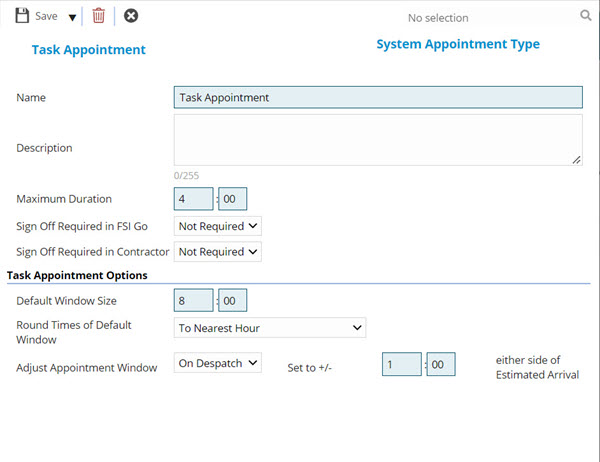
 Click to view - Appointment Type Fields and Descriptions
Complete the fields and click Save and Close  .
.