PPM Issue Templates
PPM Issue Templates in MRI Evolution automate the scheduling and issuance of Planned Preventative Maintenance (PPM) tasks, ensuring timely maintenance and regulatory compliance. This integration allows organizations to define rules for auto-Issuing PPM Tasks based on frequency, contract, and operational requirements.
Workflow: Users can create and configure PPM Issue Templates, specifying advance issuance periods and linking them to contracts and PPM settings. The system automatically generates and assigns PPM tasks according to these rules, reducing manual effort and supporting proactive maintenance management.
Example: A maintenance planner sets up a PPM Issue Template to auto-issue quarterly PPMs 30 days in advance. The system generates the tasks, notifies relevant teams, and ensures all maintenance is scheduled and tracked within Evolution.
PPM Issue Templates
The link will open the PPM Issue Template grid. It is a grid view which can be searched, sorted and customised as normal.
To add a new PPM Issue Template click New  , to edit an existing PPM Issue Template click Edit
  . A pop up window will appear which will allow the creation or amendment of a PPM Issue Template.
Click the  button to run the OP-MT018b Template Auto Issue Integrity report.
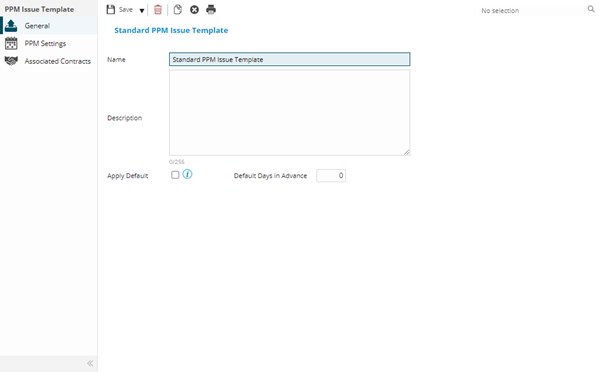
 Click to view - PPM Issue Template Fields and Descriptions
Complete the fields and click Save  . Once the PPM Issue Template header has been completed and saved a sub navigation will appear to allow additional entities to be created / assigned.
These include:
- PPM Settings
- Associated Contracts
PPM Settings
Click to view more detail
The PPM settings allow the rules to be set for PPM auto-issuing e.g. weekly PPMs can be set to auto-issue 1 day in advance and 3 monthly PPMs could be set to auto-issue 7 days in advance.
PPM Settings must be unique to the Issue Template e.g. the same setting cannot be repeated within the same template.
PPM Issue Templates
The link will open the PPM Issue Templates / PPM Settings grid. It is a grid view that can be customised and sorted as normal.
To add a new PPM Setting click New , to edit an existing PPM Setting click Edit . A pop up window will appear which will allow the creation or amendment of a PPM Setting
Click to view - PPM Setting Fields and Descriptions
Complete the fields and click Save and Close  .
.
Repeat the process until all required PPM Settings have been created.
Associated Contracts
Click to view more detail
Contracts are associated with PPM settings to ensure that PPMs can be auto-issued correctly for each Contract.
PPM Issue Templates
The link will open the PPM Issue Templates / Associated Contracts grid. It is a grid view that can be customised and sorted as normal.
To assign Contracts click Assign , entities in the right hand assignment window are connected.
To create Contracts see Contracts
For Auto Issuing to work the Offloading Feature must be configured