Timesheet System Preferences
Available from 4.8.0.0
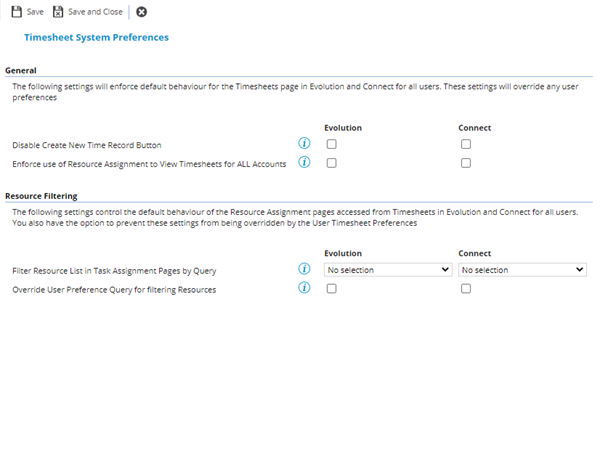
System-wide settings controlling default Timesheets page behaviour and Resource filtering for assignment throughout Evolution and Connect. Overrides individual user preferences.
Ensures organizational consistency in timesheet workflows and resource assignment visibility across all users.
 Available from 7.0.0.0
The Purchase Key licence dependency for this specific element of the system has been removed and is now included as standard in the core MRI Evolution product the feature has been turned on for all systems by default.
Note: Other restrictions, such as User licence type restrictions and / or any restrictions to underlying functionality that is dependent upon Purchase Key licences will remain in place.
Settings > Tasks > Timesheet System Preferences
| Field Name |
Description |
| General
|
|
| Disable Create New Time Record Button |
Check boxes for MRI Evolution and Evolution Connect |
| Enforce use of Resource Assignment to View Timesheets for ALL Accounts |
Check boxes for MRI Evolution and Evolution Connect |
| Resource Filtering
|
|
| Filter Resource List in Task Assignment Pages by Query |
Drop down lists for MRI Evolution and Evolution Connect The drop downs allow selection of any System Query defined for the F_RESOURCE entity. This selection will be used as the default query to restrict the list of Resources shown in the Task Time Record Assignment pages accessed from Timesheets in MRI Evolution and Evolution Connect for all users. Any standard filter criteria relevant to the Task (such as Contract Supplier and Building) or preferences selected by the user on the page (such as On/Off Duty or ignoring Resource Building Links) will still apply. |
| Override User Preference Query for filtering Resources |
Check boxes for MRI Evolution and Evolution Connect |
 Click to view - Task Preference Fields and Descriptions