Resource Planner User Preferences
The Resource Planner User Preferences in MRI Evolution allow users to tailor the planner interface and workflow to their specific needs. These preferences integrate with the scheduling and resource allocation modules, ensuring that each user sees the most relevant information for their role.
For example, a user can configure which days, times, or resource types are displayed by default, making it easier to manage bookings and view schedules that matter most to them.
The Resource Planner User Preferences are maintained here, supporting a personalized and efficient planning experience.
Settings > User Settings > Resource Planner User Preferences
The link will open the User Preferences Resource Planner window.
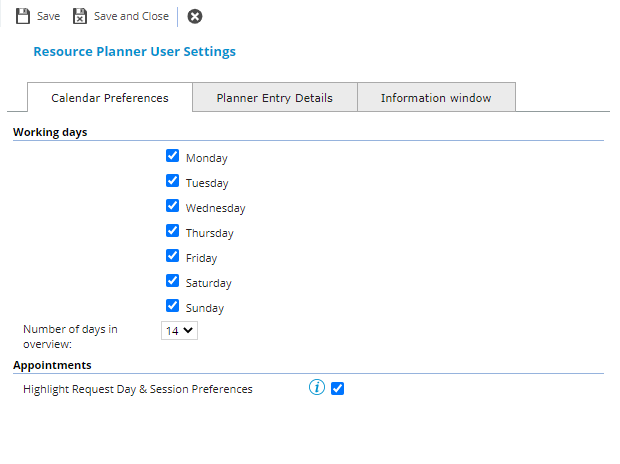
Calender Preferences Tab
Check the boxes to select the days of the week to display in the Resource Planner.
From the drop down select the Number of days in overview . The number of days displayed relates to calendar days and not display days. Therefore, if you choose to see only Monday – Friday and 14 days from the drop down, only 10 days will be displayed, the 10 working days from the 14 calendar days chosen.
Available from 5.5.0.0
Highlight Request Day & Session Preferences check box - enables or disables the functionality to highlight the preferred appointment Calendar Day and Calendar Session in the Resource Planner.
Planner Entry Details Tab
Planner Entry Details are the details that are shown in each planner entry. The screen is divided into three sections, Time Records, Absences and Notes.
Values can be assigned for each section, click Assign  , entities in the right hand assignment window are connected.
Information Window Tab
The Information Window appears when a planner entry is left clicked. The screen is divided into three sections, Time Records, Absences and Notes.
Values can be assigned for each section, click Assign , entities in the right hand assignment window are connected.