Menu Items
Navigation entries linking to pages or URLs within Evolution, Connect, and Reach interfaces. Each menu item defines name, display label, platform availability, and optional publishing dates for controlled interface access.
Settings > Widgets & Home Pages > Menu Items
The link will open a pop up window will appear which will allow the creation or amendment of Menu Items.
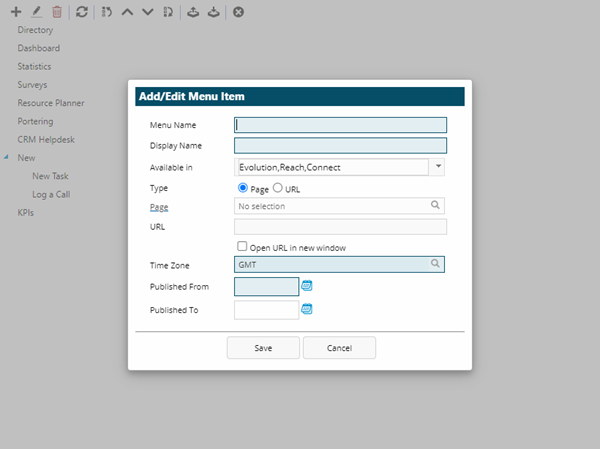
 Click to view - Menu Items Fields and Descriptions
| Field Name | Description |
|---|---|
| Menu Name | The name for the menu item. |
| Display Name | The user-facing label text that appears in the Evolution navigation menu, mobile app menu, or Connect portal menu for this custom menu item (e.g., "My Dashboard", "Submit Request", "View My Tasks", "Team Schedule", "Reports Portal"). The Display Name is what end-users see and click to access the linked page or URL, so it should be clear, concise, and action-oriented using terminology familiar to your user community. Can differ from the internal Menu Name for administrative clarity. Supports internationalization for multi-language deployments where different Display Names can be configured per locale. Maximum 50 characters. Use sentence case and avoid technical jargon. This label appears across Evolution desktop, Reach mobile app, and Connect self-service portal depending on the "Available in" checkbox selections. |
| Available in | Check the box to make the menu item available in MRI Evolution, Evolution Connect or Evolution Reach. |
| Type | Check the radio button to make the menu item link to a page or a URL. |
| Page | If the menu item is linked to a page, select the page from the drop down. |
| URL | If the menu is linked to a URL, enter the URL. |
| Open URL in new window | Check the box to open the URL in a new window |
| Published From | Enter the date to publish the page from |
| Published To | Enter the date to publish the page to. |
Complete the fields and click Save
Menu Items order can be rearranged using Move Up  and Move Down
  .
.
Menu items, pages and widgets can be imported and exported via a browsing function
User Accounts and Roles can now be granted access to the Menu Items.