Widget - Service Catalogue
Available from 4.4.8.0
Customizable widget enabling users to log service requests as tasks through targeted instruction set catalogues. Multiple widgets support role-specific service offerings with configurable field assignments, default values, and context help.
Settings > Widgets & Home Pages > Widgets > Widget - Service Catalogue
The link will open the Widgets grid. It is a grid view which can be searched, sorted and customised as normal.
To add a new Widget click New  , to edit an existing Widget click Edit
  . A pop up window will appear which will allow the creation or amendment of a Widget.
Select the Widget template : Service Catalogue. Complete the fields and click Save  . Click Configure Widget
  .
.
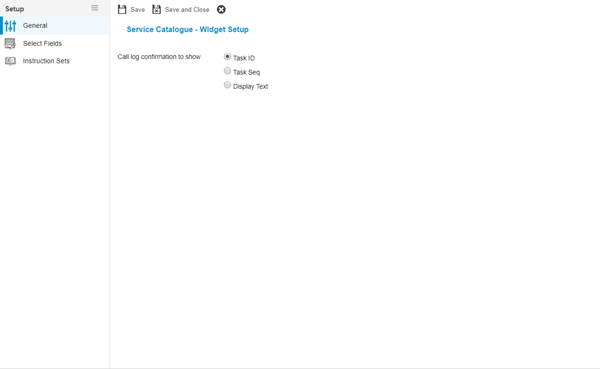
 Click to view - Widget Set up Fields and Descriptions
Complete the fields and click Save . Fields and Instruction Sets can now be assigned to the Service Catalogue via the sub navigations Select Fields and Instruction Sets.
Select Fields
Click to view more detail.
Select fields allows the User to define which fields will need to be populated by the Service Catalogue and if any of them have default information
Validation rules apply to these fields e.g. Contract is a mandatory field to be able to log a Task. If more than one Contract could potentially complete the Task that will be created by the Service Catalogue default options may need to be set.
Settings > Widgets & Home Pages > Widgets > Widget - Service Catalogue
The link will open the Select Fields grid. It is a grid view that can be customised and sorted as normal.
To assign Fields click Assign  , entities in the right hand assignment window are connected.
The order of the Fields can be adjusted using Move Up  and Move Down
  .
.
Once Fields have been assigned the Fields Setup can be configured. Double click the field to configure.
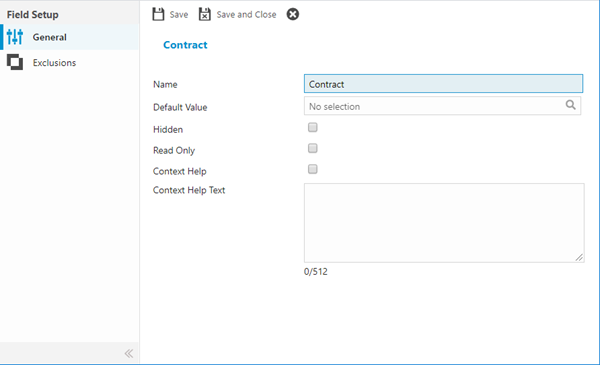
Click to view - Fields Set Up Fields and Descriptions
Exclusions
Click to view more detail.
Values can be excluded from the Service Catalogue, these excluded values need to be assigned via sub navigation Exclusions.
Settings > Widgets & Home Pages > Widgets > Widget - Service Catalogue
The link will open the Exclusions grid. It is a grid view that can be customised and sorted as normal.
To assign Exclusions click Assign , entities in the right hand assignment window are connected.
Complete the fields and click Save and Close  .
.
Instruction Sets
Click to view more detail.
Instruction Sets are assigned to the Service Catalogue to create the choice of service requests a User can choose from.
Settings > Widgets & Home Pages > Widgets > Widget - Service Catalogue
The link will open the Service Catalogue / Instruction Set grid. It is a grid view that can be customised and sorted as normal.
To assign Instruction Sets click Assign, entities in the right hand assignment window are connected.
Click Save .
If Instruction Sets have not been assigned a Master Rate Item and an Instruction Set image, they will be unavailable to assign.