Visual Booking Preferences
Visual Booking Preferences allow administrators to control how facilities can be booked, cancelled, and managed within MRI Evolution Widgets. These preferences ensure that booking behaviours align with organizational policies and user needs.
- Business Value: Centralizes control of booking rules, reduces booking conflicts, and streamlines user experience for both administrators and end users.
- Actionable Guidance: To configure preferences, open the Facilities Booking Preferences page in MRI Evolution, adjust the settings (such as cancellation limits and task prompts), and click Save and Close. These changes will immediately affect how bookings are handled in all connected widgets.
- Practical Example: If your organization wants to prevent last-minute cancellations, set the Booking Cancellation Limit to a suitable number of hours. Users will then be unable to cancel bookings within that window, ensuring better resource planning.
- Tip: Use the Disable prompting to cancel and recreate booking Tasks option to automate or restrict user prompts when bookings are changed, reducing manual intervention.
Settings > Widgets & Home Pages > Visual Booking Preferences
The link will open the Facilities Booking Preferences. A pop up window will appear which will allow the creation or amendment of a Facilities Booking Preferences.
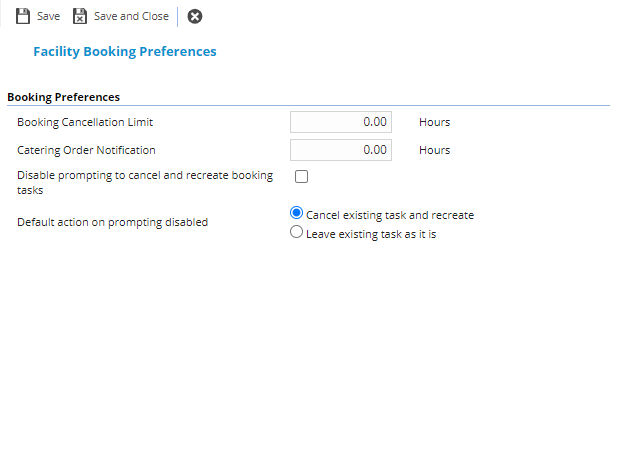
 Click to view - Facilities Booking Preferences Fields and Descriptions
Complete the fields and click Save and Close  .
.