Helpdesk - Multiple Reporters
The Multiple Reporters feature allows you to assign more than one reporter (contact) to a single Task. This is useful when several people need to be associated with or notified about the same Task.
To add a new reporter, use the Quick Create new Contact button. To assign an existing contact, click Assign and select from the available list. All assigned reporters will be visible and manageable within the Task grid.
Business Value: Associating multiple reporters ensures all relevant stakeholders are informed and can contribute to Task progress, improving communication and accountability.
Action: Use the grid to add or assign reporters as needed. Review the list to confirm all necessary contacts are included for each Task.
Task Management > Helpdesk > Helpdesk - Multiple Reporters
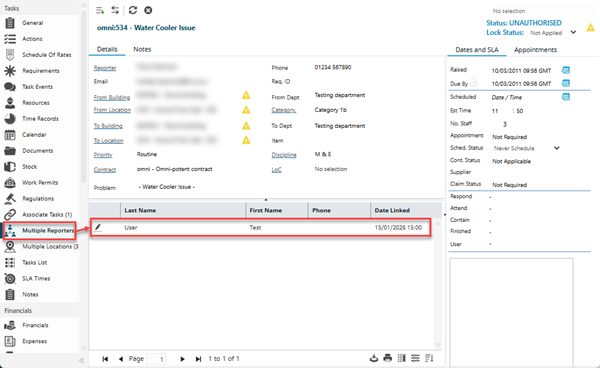
The link will open the Helpdesk / Multiple Reporters grid. It is a grid that can be sorted and customised as normal.
New Reporters (Contacts) can be added by clicking the Quick Create new Contact  button. A pop-up will appear, allowing users to enter details of the new Contact. Once saved the new Contact will be automatically added as a Multiple Reporter.
To assign a Multiple Reporter from the existing Contacts, click Assign  , entities in the right hand assignment window are connected.