Helpdesk - WIP Cost Breakdowns
The WIP (Work In Progress) Cost Breakdowns feature in the Helpdesk module provides detailed tracking and reporting of ongoing task costs in MRI Evolution. This integration enables users to monitor, regenerate, and report on WIP costs, supporting financial transparency and project control.
Workflow: Users can view WIP information, regenerate cost breakdowns, and print WIP reports directly from the Helpdesk. Manual adjustments can be made as needed, and all changes are logged for audit purposes. The system integrates with cost templates and reporting modules for comprehensive financial management.
Example: A project manager reviews the WIP Cost Breakdown for a complex maintenance task, regenerates the cost summary to reflect recent work, and prints a WIP report for client review. This ensures all costs are accurately captured and reported within Evolution.
Task Management > Helpdesk > Helpdesk - WIP Cost Breakdowns
The link will open the Advance Helpdesk / WIP Cost Breakdown grid. It is a grid view which can be searched, sorted and customised as normal.
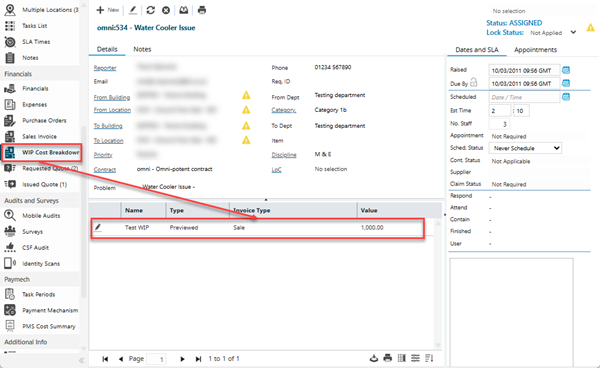
To generate or preview an Cost Invoice from the Helpdesk click Regenerate Task Cost Breakdown  .
.
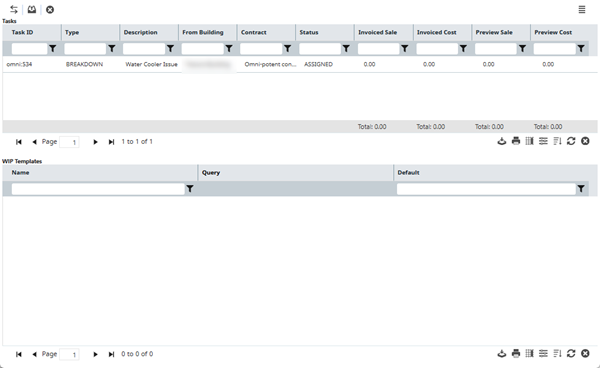
The Task Information will appear in the upper pane of the pop up window, available WIP Templates will appear in the Lower pane of the window.
To generate WIP costs, highlight the Task and the WIP Template and click Regenerate Task Type Cost Breakdowns  . This will create a Draft WIP Cost Breakdown.
Click WIP Report  to print the WIP-001 WIP Task Cost Summary report.