Task Time Records
Once a Task has been logged it can be assigned to a Resource to complete the works. Each Resource can be assigned their own Time Record(s) to the details of each visit.
Task Management > Advanced Helpdesk - Time Records
Task Management > Task Appointments - Time Records
Task Management > Timesheets - Time Records
The link will open the Advanced Helpdesk / Time Records grid. It is a grid view which can be searched, sorted and customised as normal.
To add a new Time Record click New  , to edit an existing Time Record click Edit
  . A pop up window will appear which will allow the creation or amendment of a Time Record.
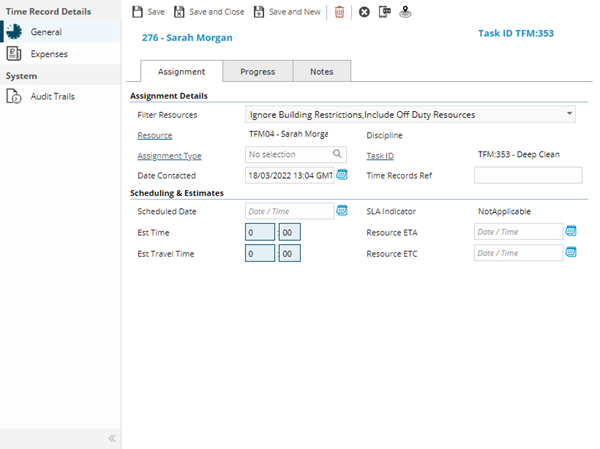
Time Record - Assignment Tab
 Click to view more detail
| Field Name | Description |
|---|---|
| Filter Resources | ... |
| Resources | From the drop down select the Resource to be assigned to the Task. |
| Discipline | ... |
| Assignment Type | ... |
| Task ID | Auto-populated with the Task ID. |
| Include all Suppliers Resources | Check the box to make visible additional Suppliers Resources including ones that are not assigned to the Building of the Task. |
| Include off - duty resources? | Check the box to make visible additional Supplier Resources including ones that are currently off duty - ISM module. |
| ID Number | Auto-populated with the ID Number of the assigned Resource. |
| Date Scheduled | Enter the date the Task is scheduled to be completed. |
| Time Records Ref | Free type ref field that can be used to filter time sheets - if the "Make Timesheet Reference Compulsory" check box is ticked against the Contract, this field will be a compulsory field that must be completed before a Task can be moved to Complete. |
| Date Started | Enter the date the Task was started. |
| Date Contacted | Enter the date that the Resource was Contacted about the Task. |
| Est Time | Enter the Estimated Time to complete the Task. |
| Date Contained | Enter the date the Task was Contained (temporarily fixed or made safe). |
| Assignment Type | From the drop down select the Assignment Type - for more information see Assignment Types. |
| Est Travel Time | Enter the Estimated Travel time. |
| Status | From the drop down select the Time Record Status. |
| Core Time | Enter the hours spent on the Task at core time - if a Resource has core time rates set against them MRI Evolution will start to calculate Labour Costs. |
| O / T Rate 1 | Enter the hours spent on the Task at over time rate 1 - if a Resource has over time rate 1 rates set against them MRI Evolution will start to calculate Labour Costs. |
| O / T Rate 2 | Enter the hours spent on the Task at over time rate 2- if a Resource has over time rate 2 set against them MRI Evolution will start to calculate Labour Costs. |
| O / T Rate 3 | Enter the hours spent on the Task at over time rate 3 - if a Resource has over time rate 3 set against them MRI Evolution will start to calculate Labour Costs. |
| Travel | Enter the hours spent on the Task, Travelling - if a Resource has Travel rates set against them MRI Evolution will start to calculate Labour Costs. |
| Wait | Enter the hours spent on the Task, waiting- if a Resource has waiting rates set against them MRI Evolution will start to calculate Labour Costs. |
| Divert | Enter the hours spent on the Task at divert - if a Resource has divert rates set against them MRI Evolution will start to calculate Labour Costs. |
| Parking | Enter the hours spent on the Task, parking- if a Resource has parking rates set against them MRI Evolution will start to calculate Labour Costs. |
| Total | Auto-calculated with the Labour Costs of the Time Record. |
| Vehicle Cost | Enter Vehicle Costs. |
| Mileage Cost | Enter Mileage Costs. |
| Distance Travelled | Enter distance travelled. |
| Date Finished | Enter the date finished. |
| Downtime | Enter the time the Asset associated with the Task was down / faulty. |
| Expense Cost | Auto-calculated with the expense totals against the Time Record. |
| Calculated Cost | Auto-calculated by adding the Labour Costs and Expense Cost together. |
| Time between start and finish | Auto-calculated to show total hours spent on the Task for this Time Record. |
| Resolution | From the drop down select the Time Record Resolution. |
Complete the fields and click Save  . Once the Time Record header has been completed and saved a sub navigation will appear to allow additional entities to be assigned.
These include:
- Expenses
Time Record - Progress Tab
Click to view more detail
| Field Name | Description |
|---|---|
| Filter Resources | Filter Resources multi-select drop down |
| Resources | From the drop down select the Resource to be assigned to the Task. |
| Discipline | ... |
| Assignment Type | ... |
| Task ID | Auto-populated with the Task ID. |
| Include all Suppliers Resources | Check the box to make visible additional Suppliers Resources including ones that are not assigned to the Building of the Task. |
| Include off - duty resources? | Check the box to make visible additional Supplier Resources including ones that are currently off duty - ISM module. |
| ID Number | Auto-populated with the ID Number of the assigned Resource. |
| Date Scheduled | Enter the date the Task is scheduled to be completed. |
| Time Records Ref | Free type ref field that can be used to filter time sheets - if the "Make Timesheet Reference Compulsory" check box is ticked against the Contract, this field will be a compulsory field that must be completed before a Task can be moved to Complete. |
| Date Started | Enter the date the Task was started. |
| Date Contacted | Enter the date that the Resource was Contacted about the Task. |
| Est Time | Enter the Estimated Time to complete the Task. |
| Date Contained | Enter the date the Task was Contained (temporarily fixed or made safe). |
| Assignment Type | From the drop down select the Assignment Type - for more information see Assignment Types. |
| Est Travel Time | Enter the Estimated Travel time. |
| Status | From the drop down select the Time Record Status. |
| Core Time | Enter the hours spent on the Task at core time - if a Resource has core time rates set against them MRI Evolution will start to calculate Labour Costs. |
| O / T Rate 1 | Enter the hours spent on the Task at over time rate 1 - if a Resource has over time rate 1 rates set against them MRI Evolution will start to calculate Labour Costs. |
| O / T Rate 2 | Enter the hours spent on the Task at over time rate 2- if a Resource has over time rate 2 set against them MRI Evolution will start to calculate Labour Costs. |
| O / T Rate 3 | Enter the hours spent on the Task at over time rate 3 - if a Resource has over time rate 3 set against them MRI Evolution will start to calculate Labour Costs. |
| Travel | Enter the hours spent on the Task, Travelling - if a Resource has Travel rates set against them MRI Evolution will start to calculate Labour Costs. |
| Wait | Enter the hours spent on the Task, waiting- if a Resource has waiting rates set against them MRI Evolution will start to calculate Labour Costs. |
| Divert | Enter the hours spent on the Task at divert - if a Resource has divert rates set against them MRI Evolution will start to calculate Labour Costs. |
| Parking | Enter the hours spent on the Task, parking- if a Resource has parking rates set against them MRI Evolution will start to calculate Labour Costs. |
| Total | Auto-calculated with the Labour Costs of the Time Record. |
| Vehicle Cost | Enter Vehicle Costs. |
| Mileage Cost | Enter Mileage Costs. |
| Distance Travelled | Enter distance travelled. |
| Date Finished | Enter the date finished. |
| Downtime | Enter the time the Asset associated with the Task was down / faulty. |
| Expense Cost | Auto-calculated with the expense totals against the Time Record. |
| Calculated Cost | Auto-calculated by adding the Labour Costs and Expense Cost together. |
| Time between start and finish | Auto-calculated to show total hours spent on the Task for this Time Record. |
| Resolution | From the drop down select the Time Record Resolution. |
Complete the fields and click Save . Once the Time Record header has been completed and saved a sub navigation will appear to allow additional entities to be assigned.
These include:
- Expenses
Time Record - Notes Tab
Click to view more detail
| Field Name | Description |
|---|---|
| Filter Resources | ... |
| Resources | From the drop down select the Resource to be assigned to the Task. |
Expenses sub navigation
Click to view more detail.
Expenses can be used to record any incidental costs that a Resource has incurred whilst on a Task.
Task Management > Advanced Helpdesk - Time Records - Expenses
The link will open the Time Record / Expenses grid. It is a grid view that can be customised and sorted as normal.
To add a new Expense click New , to edit an existing Expense click Edit . A pop up window will appear which will allow the creation or amendment of an Expense.
Click to view - Expense Fields and Descriptions
Complete the fields and click Save and Close  .
.
To create Resources see Resources
Additional Icons
| Additional Icons | Name | Description |
|---|---|---|

|
Send Evolution Go Notification |
Available from 4.5.3 Allows a Evolution Go Notification to be sent to the User. For more information see Evolution Go Resource Functionality |

|
Last Known Location |
Available from 4.5.3 Click for a pop up map showing the User's last know Location. For more information see Evolution Go Resource Functionality |