Client Register
Clients in MRI Evolution represent the people, organizations, or contracts to which invoices and credit notes are linked. Setting up Clients ensures accurate billing, reporting, and relationship management across your business. Users can add new Clients, update details, and configure Rule Groups to control how each Client is invoiced. This structure supports flexible invoicing processes, clear client communication, and compliance with financial requirements. To manage Clients, use the Clients grid to create, edit, or review client records as needed.
 Available from 7.0.0.0
The Purchase Key licence dependency for this specific element of the system has been removed and is now included as standard in the core MRI Evolution product the feature has been turned on for all systems by default.
Note: Other restrictions, such as User licence type restrictions and / or any restrictions to underlying functionality that is dependent upon Purchase Key licences will remain in place.
Modules > Sales Invoicing > Clients
The link will open the Clients grid. It is a grid view which can be searched, sorted and customised as normal.
To add a new Clients click New  , to edit an existing Clients click Edit
  . A pop up window will appear which will allow the creation or amendment of a Client.
Click the  button to run the IN-STA001 Statement of Client Account report.
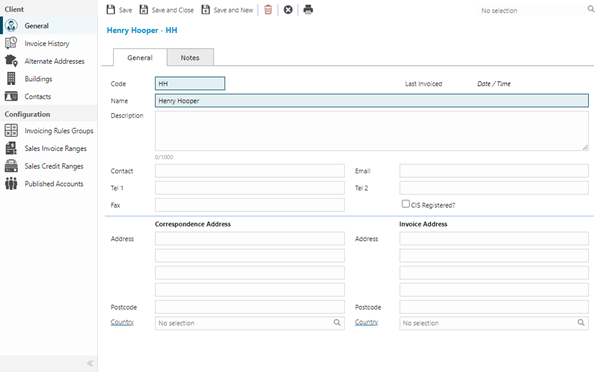
 Click to view - General Tab Fields and Descriptions
Click to view - Notes Tab Fields and Descriptions
Complete the fields and click Save  . Once the Client header has been completed and saved a sub navigation will appear to allow additional entities to be assigned, viewed or created.
These include:
- Invoice History
- Alternate Addresses
- Buildings - Available from 6.1.0.0
- Contacts
- Invoicing Rule Groups
- Sales Invoice Ranges
- Sales Credit Ranges
- Published Accounts
Invoice History
Click to view more detail.
Invoice History shows all invoices that have been created for a Client. An invoice can be opened and edited from this screen if required.
Modules > Sales Invoicing > Clients
The link will open the Clients / Invoice History grid. It is a grid view that can be customised and sorted as normal.
Alternate Addresses
Click to view more detail.
A client may have different addresses that they wish certain invoices to be sent to. Alternate Addresses can be entered so this requirement to be can meet. Numerous alternate addresses can be held for a client.
Modules > Sales Invoicing > Clients
The link will open the Clients / Alternate Address grid. It is a grid view which can be searched, sorted and customised as normal.
To add a new Alternate Address click New , to edit an existing Alternate Address click Edit . A pop up window will appear which will allow the creation or amendment of a Alternate Address
Click to view Alternate Address Fields and Descriptions
Buildings
Click to view more detail.
Available from 6.1.0.0
Clients can be associated with a Building by selecting the Client in the Client ID field of the Building input panel.
Buildings associated with the current Client in this way will be displayed in the sub navigation.
Modules > Sales Invoicing > Clients
The link will open the Clients / Buildings grid. It is a grid view that can be customised and sorted as normal.
To create Buildings see Buildings
Contacts
Click to view more detail.
Contacts can be linked to Clients.
Modules > Sales Invoicing > Clients
The link will open the Clients / Contacts grid. It is a grid view that can be customised and sorted as normal.
To assign Contacts click Assign  , entities in the right hand assignment window are connected.
To create Contacts see Contacts
Invoicing Rules Groups
Click to view more detail
Invoicing Rule Groups are used to generate the required invoices for the Client.
Modules > Sales Invoicing > Clients
The link will open the Clients / Invoicing Rule Group grid. It is a grid view that can be customised and sorted as normal.
To add a new Invoicing Rule Group click New , to edit an existing Invoicing Rule Group click Edit . A pop up window will appear which will allow the creation or amendment of an Invoicing Rule Group.
To create Invoicing Rule Groups see Sales Invoicing Rule Group
Sales Invoice Ranges
Click to view more detail.
if Authorisation Ranges are in use they can be applied to all Clients, or different levels can be set to individual Clients. If individual ranges are to be applied to Clients the ranges must be assigned to each Client.
Modules > Sales Invoicing > Clients
The link will open the Sales Invoice Ranges grid. It is a grid view that can be customised and sorted as normal.
To assign Sales Invoice Ranges click Assign , entities in the right hand assignment window are connected.
To create Sales Invoice Ranges see Sales Invoice Ranges and Limits.
To turn on the Authorisation model see Sales Invoicing and Credit Preferences.
Sales Credit Ranges
Click to view more detail.
If Authorisation Ranges are in use they can be applied to all Clients, or different levels can be set to individual Clients. If individual ranges are to be applied to Clients the ranges must be assigned to each Client.
Modules > Sales Invoicing > Clients
The link will open the Sales Credit Ranges grid. It is a grid view that can be customised and sorted as normal.
To assign Sales Credit Ranges click Assign , entities in the right hand assignment window are connected.
To create Sales Credit Ranges see Sales Credit Ranges and Limits.
To turn on the Authorisation model see Sales Invoicing and Credit Preferences.
Published Accounts
Click to view more detail
Available from 4.8.0.0
Sales Invoicing Clients have the ability to be published to Accounts. This means that it is possible to restrict the visibility of all Sales Invoice data on so that an account only sees data for the Clients they have been allocated
The link will open the Published Accounts grid. It is a grid view that can be customised and sorted as normal.
To assign User Accounts click Assign , entities in the right hand assignment window are connected.