Contact Directory
The Contact Directory stores organizational contact records for people associated with buildings, assets, contracts, and other entities (for example, building managers, tenant representatives, contractor technicians, equipment suppliers, emergency contacts). Create contacts with detailed information including name, job title, organization, phone numbers, email, and contact class (for example, Internal Staff, External Contractor, Supplier, Tenant). When logging a helpdesk issue, technicians can quickly select the issue reporter from the Contact Directory drop down rather than typing details manually, the system auto-populates name, phone, and location information, accelerating issue logging and ensuring accurate contact data. Link contacts to specific buildings, departments, or suppliers to support filtered searches (for example, "show me all electrical contractors" or "list all contacts at Building A"). Use contact classes to organize people by relationship type, enabling targeted communications (for example, email all tenant contacts about planned maintenance). This centralized contact management reduces duplicate data entry, ensures consistency across modules (helpdesk, tasks, contracts, assets), and provides quick access to key personnel information during emergencies or routine operations.
Facilities > Contacts > Contacts
The link will open the Contacts grid. It is a grid view which can be searched, sorted and customised as normal.
To add a new Contact click New  , to edit an existing Contact click Edit
  . A pop up window will appear which will allow the creation or amendment of a Contact.
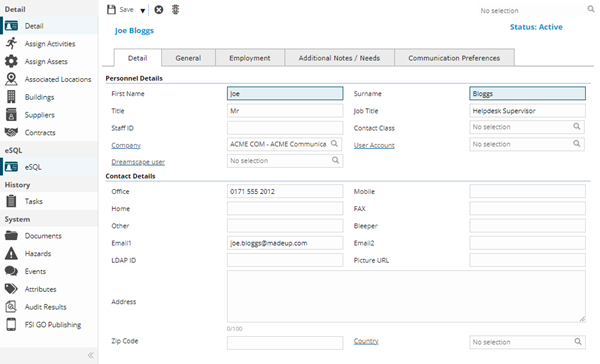
 Click to view - Detail Tab Fields and Descriptions
Click to view - General Tab Fields and Descriptions
Click to view - Employment Tab Fields and Descriptions
 Available from 7.0.0.0
Click to view - Additional Notes / Needs Tab Fields and Descriptions
Click to view - Communication Preferences Tab Fields and Descriptions
Complete the fields and click Save  .
.
Once the Contact header has been completed and saved a sub navigation will appear to allow additional entities to be assigned.
These include:
- Assign Activities
- Assign Assets
- Associated Locations
- Buildings
- Suppliers
- Contracts
- Tasks
Assign Activities
Click to view more detail.
Within day-to-day operations, Contacts may be required to undertake certain activities. For example: fire drills and staff induction. Assigned Activities can be used to record these.
Facilities > Contacts > Contacts
The link will open the Contacts / Activity grid. It is a grid view that can be customised and sorted as normal.
To add a new Activity click New , to edit an existing Activity click Edit . A pop up window will appear which will allow the creation or amendment of a Activity.
Click to view - Activity Fields and Descriptions
Complete the fields and click Save and Close  .
.
To create Activity Types see Activity Type
Assign Assets
Click to view more detail.
Assets can be assigned to a Contact, this keeps a record of who has the equipment, when they took possession and when it was returned.
Facilities > Contacts > Contacts
The link will open the Contacts / Asset grid. It is a grid view that can be customised and sorted as normal.
To add a new Contact Asset Assignment click New , to edit an existing Contact Asset Assignment click Edit . A pop up window will appear which will allow the creation or amendment of an Assigned Asset
Click to view - Assign Assets Fields and Descriptions
Complete the fields and click Save and Close .
To create Assets see Asset Register
Associated Locations
Click to view more detail.
Contacts can be assigned to multiple Locations. If multiple Locations are applied when the Contact is selected on the Helpdesk or within the Helpdesk Widget, a pop up window will appear showing the assigned multiple Locations to choose from.
Available from 4.4.8.0
This feature was also made available in the Helpdesk widget in 4.4.8.
Facilities > Contacts > Contacts
The link will open the Contacts / Associated Locations grid. It is a grid view that can be customised and sorted as normal.
To assign Locations click Assign  , entities in the right hand assignment window are connected.
To create Locations see Location Register
Buildings
Click to view more detail.
A Contact can be directly assigned as a Building Contact. Assigning Buildings to a Contact will auto-populate the Building Contacts.
Facilities > Contacts > Contacts
The link will open the Contacts / Buildings grid. It is a grid view that can be customised and sorted as normal
To assign Buildings click Assign , entities in the right hand assignment window are connected.
To create Buildings see Building Register
Suppliers
Click to view more detail.
A Contact can be associated with Suppliers. Assigning Suppliers to a Contact will auto-populate the Supplier Contacts.
Facilities > Contacts > Contacts
The link will open the Contacts / Suppliers grid. It is a grid view that can be customised and sorted as normal
To assign Suppliers click Assign , entities in the right hand assignment window are connected.
To create Suppliers see Supplier Register
Contracts
Click to view more detail.
A Contact can be associated with Contracts. Assigning Contracts to a Contact will auto-populate the Contract Contacts.
Facilities > Contacts > Contacts
The link will open the Contacts / Contracts grid. It is a grid view that can be customised and sorted as normal
To assign Contracts click Assign , entities in the right hand assignment window are connected.
To create Contracts see Contract Register
Tasks
Click to view more detail.
Available from 4.9.0.0
The Tasks sub navigation contains a grid of Tasks where the current Contact is the Main Reporter.
Uncheck the "Include Tasks where Contact is not Main Reporter" to additionally see Tasks where the current Contact is one of the Multiple Reporters.
New Tasks can be created from here by clicking the  Quick Entry toolbar button. A pop-up containing the Quick Entry helpdesk will open.
Facilities > Contacts > Contacts
The link will open the Contacts / Tasks grid. It is a grid view that can be customised and sorted as normal
Additional Icons
| Additional Icon | Name | Description |
|---|---|---|

|
Contact Status |
Available from 4.8.0.0 From the drop down select the Contact Status To create a Contact Status see Contact Status |