General Preferences
General Preferences represents a foundational system configuration and operational governance platform that enables administrators to establish critical system-wide behavioural parameters, performance optimization settings, and user experience customizations throughout the MRI Evolution environment. This comprehensive administration tool provides granular control over system responsiveness through auto-complete timing configurations, hierarchical data presentation capabilities, query performance optimization, security protocols for digital signatures, visual customization through colour schemes and branding, and navigation behaviour management. By centralizing these essential system parameters, General Preferences empowers organizations to optimize system performance, enhance user productivity, maintain consistent branding standards, ensure security compliance, and deliver superior user experiences through systematic configuration management and data-driven system optimization.
Settings > System Administration > System Appearance & Behaviour > General Preferences
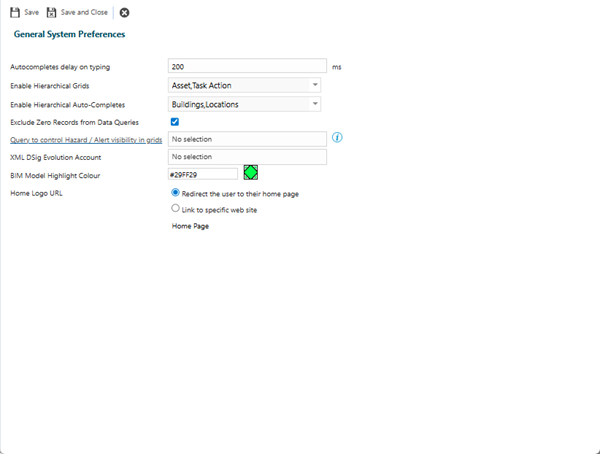
| Field Name |
Description |
| Auto-completes delay on typing |
The default value in this box is 200 ms (milliseconds) but this can be reduced to shorten the delay in searching when typing into an auto-complete field. |
| Enable Hierarchical Grids |
Available from 5.0.0.0
Check the box to enable Hierarchical grids on Assets and Instruction Sets.
Available from 6.4.1.0
The check box has been replaced with a multi-select drop-down of system entities that can have hierarchical grids enabled.
Select all required values from the following:
|
| Enable Hierarchical Auto-Completes |
 Available from 7.0.0.0 Available from 7.0.0.0
Where a hierarchical data structure has been enabled for MRI Evolution entities, the auto-completes for the entity can display the parent/child relationship data by checking the required values from the dropdown:
-
Buildings
-
Locations
-
Categories
|
| Exclude Zero Records from Data Queries |
Enable this option to prevent a legacy check for the presence of zero records in the database tables prior to running the query to return records. Enabling this option should provide a performance improvement when returning data to the user.
This option will be enabled automatically during the data transfer process if zero records are not present in the database tables.
Enabling this option while zero records are present in the database tables will have adverse affects to the system - blank rows will appear in auto-completes, grids and assignment controls, in some cases the page may error.
|
| Query to control Hazard / Alert visibility in grids |
Available from 5.3.0.0
Optionally, select the most appropriate Query from the list of Hazards & Alert specific Queries that will be used to filter records in grids containing Hazards & Alerts throughout the system.
The field label is a hyper-link that allows the User to open the selected Query in the Query editor page, subject to the required Permission.
If 'No selection' is selected in the field, the hyper-link will open the Query editor, allowing the User to create their own System Query.
The -No selection- criteria for displaying Hazards & Alerts in grids is the standard 'out of the box': Status is not equal to Removed and current date is between Hazard & Alert start and end dates (taking NULL dates in to account).
|
| XML DSig MRI Evolution Account |
Account used for digital signatures in web services. |
| BIM Model Highlight Colour |
Available from 4.7.0.0
Set a colour that will be used to highlight BIM Model objects, such as Assets, when viewing BIM Models via MRI Evolution.
Enter an RGB colour code or use the colour picker to set the desired colour.
|
| Home Logo URL |
Available from 5.9.0.0
Radio button options to control the behaviour of the  Home button, when clicked: Home button, when clicked:
|
From version 4.8.0.0 Self Registration for Evolution Reach preferences were moved to Settings > User Accounts > Account Consent and Registration. For more information see Account Consent and Registration Settings
From version 5.7.0.0 the 'Ignore Contract View on Priority when assigning Instruction Sets' preference was moved to System Preferences > Contract View Settings - General Preferences tab.
Complete the fields and click Save and Close  .
.
 Click to view - General Preferences Fields and Descriptions