Supplier Directory
Manage vendor and contractor relationships within MRI Evolution procurement and resource management system. Suppliers provide services, goods, and resources across contract divisions, supporting purchase order workflows, resource allocation, and comprehensive vendor management for facility operations.
Settings > Finance > Suppliers
or
Facilities > Suppliers
The link will open the Supplier grid. It is a grid view which can be searched, sorted and customised as normal.
To add a new Supplier click New  , to edit an existing Supplier click Edit
  . A pop up window will appear which will allow the creation or amendment of a Supplier.
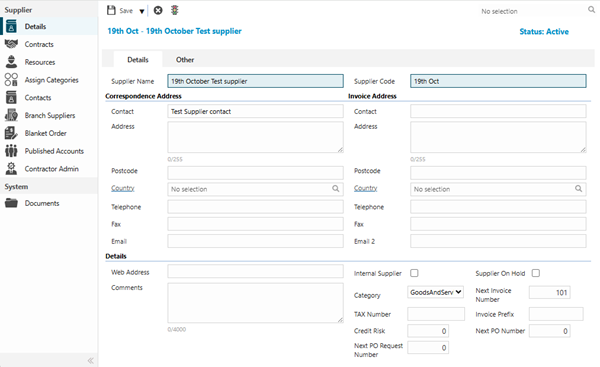
 Click to view - Details tab Fields and Descriptions
Click to view - Other Tab - Supplier Fields and Descriptions
Complete the fields and click Save  . Once the Supplier header has been completed and saved a sub navigation will appear to allow additional entities to be assigned.
These include:
- Contracts
- Resources
- Assign Categories
- Contacts
- Branch Suppliers
- Blanket Orders
- Published Accounts
- Contractor Admin
Available from 5.5.0.0
Suppliers are one of the system entities that can have Supply Chain Surveys enabled in Table Catalog, in a similar way to enabling Hazard / Alert Types against an entity.
Once enabled against the Suppliers entity, a new sub navigation will become available in the System sub navigation group of the Suppliers input panel:
Contracts
Click to view more detail.
Available from 4.5.6.0
The upper half of the page contains a grid of Contracts where the current Supplier is the Primary Supplier.
The lower half of the page contains a grid of Contracts where the current Supplier is a Secondary Supplier. The Supplier can be assigned as a Secondary Supplier to a Contract, from here.
Settings > Finance > Suppliers - Contracts
or
Facilities > Suppliers - Contracts
To assign Secondary Supplier Contracts click Assign  , Contracts in the right hand assignment window are connected.
Resources
Click to view more detail.
Available from 5.3.0.0
Resources can be added, viewed and edited directly from the Supplier.
Settings > Finance > Suppliers - Resources
or
Facilities > Suppliers - Resources
The link will open the Supplier / Resource grid. It is a grid view that can be customised and sorted as normal.
To add a new Resource click New , to edit an existing Resource click Edit . A pop up window will appear which will allow the creation or amendment of a Resource.
To create Resources see Resources
Assign Categories
Click to view more detail.
Suppliers can be grouped together using Categories.
Settings > Finance > Suppliers - Supplier Categories
or
Facilities > Suppliers - Supplier Categories
To assign Supplier Categories click Assign , entities in the right hand assignment window are connected.
To create a Supplier Category see Supplier Categories
Contacts
Click to view more detail.
Suppliers can have additional Contacts assigned to them.
Settings > Finance > Suppliers - Supplier Contacts
or
Facilities > Suppliers - Supplier Contacts
To assign Supplier Contacts click Assign , entities in the right hand assignment window are connected.
To create a Contact see Contacts
Branch Suppliers
Click to view more detail.
Suppliers can have branches based in different Locations to their main headquarters. Branches can then be used within the Purchase Order Module to reflect where goods are being delivered from.
Settings > Finance > Suppliers - Branch Suppliers
or
Facilities > Suppliers - Branch Suppliers
The link will open the Suppliers / Branch Suppliers grid. It is a grid view which can be searched, sorted and customised as normal.
To add a new Supplier Branch click New , to edit an existing Supplier Branch click Edit . A pop up window will appear which will allow the creation or amendment of a Branch Supplier.
Click to view - Branch Suppliers Fields and Descriptions
Complete the fields and click Save and Close  .
.
Blanket Orders
Click to view more detail.
Blanket Orders are used within the Purchase Order Module .
A Blanket Order is designed to cover the costing for multiple delivery dates scheduled over a period of time. A blanket order is usually used when there is a recurring need for expendable goods.
Settings > Finance > Suppliers - Blanket Orders
or
Facilities > Suppliers - Blanket Orders
The link will open the Suppliers / Blanket Orders grid. It is a grid view which can be searched, sorted and customised as normal.
To add a new Blanket Order click New , to edit an existing Blanket Order click Edit . A pop up window will appear which will allow the creation or amendment of a Blanket Order.
Click to view - Blanket Order Fields and Descriptions
Published Accounts
Click to view more detail.
Published Accounts are used within the Evolution Connect module, it enables Users to see only the Suppliers they are assigned to - Evolution Connect only.
Settings > Finance > Suppliers - Published Accounts
or
Facilities > Suppliers - Published Accounts
The link will open the Suppliers / Published Accounts grid. It is a grid view that can be customised and sorted as normal.
To assign Accounts click Assign , entities in the right hand assignment window are connected.
To create Accounts see User Accounts
Contractor Admin
Click to view more detail.
Available from 5.3.0.0
Contractor Admin is used to 'on board' Suppliers and create new users within the Contractor Gateway. The Supplier must be activated as a Sub Tenant and then new Users can be created. These users will then be invited to join the Contractor Gateway.
The link will open the Supplier / Contractor Admin grid. It is a grid view which can be searched, sorted and customised as normal.
To activate the Supplier as a sub tenant click Activate Sub Tenant  , from the drop down select the MRI Dreamscape Tenant
To suspend the Supplier from Contractor Gateway click Suspend Sub Tenant 
Click to view Contractor Admin Fields and Descriptions
Additional Icons
Available from 5.3.0.0
Suppliers can be assigned a status to allow them to be easily moved to history of suspended. To change the status of a Supplier click Change Status 
For more information or the create Supplier Statuses see Supplier Status