Cost Centres
Cost Centres let you track and control spending across buildings, departments, and contracts in MRI Evolution. Use them for budget management, financial reporting, and managing active, suspended, or historical records.
Available from 6.1.0.0
Cost Centres use a state model. The Delete button is replaced by a status change group in the grid and input panel.
Highlight a Cost Centre in the grid to change its state. The input panel shows available states for the record.
States include:
-
Active
-
Suspended
-
History
Cost Centres in Suspended or History state are excluded from selection in Cost Centre fields throughout MRI Evolution.
Settings > Finance > Cost Centres
The link will open the Cost Centre grid. It is a grid view which can be searched, sorted and customised as normal.
To add a new Cost Centre click New  , to edit an existing Cost Centre click Edit
  . A pop up window will appear which will allow the creation or amendment of a Cost Centre.
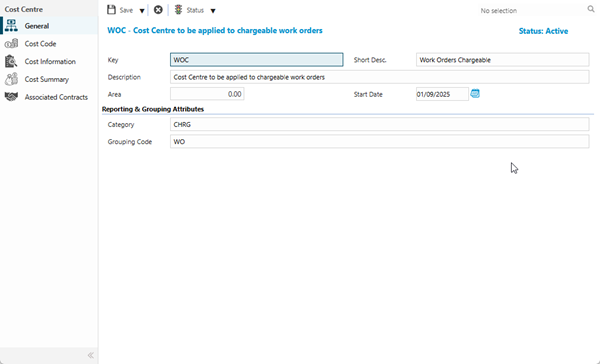
 Click to view - Cost Centre Fields and Descriptions
 Available from 7.0.0.0
Complete the fields and click Save  . Once the Cost Centre Header has been completed and saved a sub navigation will appear to allow additional entities to be assigned and completed.
These include:
- Cost Codes
- Cost Information
- Cost Summary
- Associated Contracts
Cost Codes
Click to view more detail.
Cost Codes can be assigned to Cost Centres, any mandatory Cost Codes will already be assigned.
Assigned Cost Codes appear in the list of available Cost Codes in MRI Evolution pages where a Cost Centre/Cost Code combination can be selected, unless the Cost Code is marked as Locked for the Cost Centre.
Available from 6.1.0.0
An Edit toolbar button has been added, allowing users to maintain the Cost Codes assigned to the Cost Centre.
Available from 6.1.0.0
Cost Codes can be marked as Locked with regard to the current Cost Centre. 'Locked' Cost Codes are excluded from the list of available Cost Codes for the Cost Centre.
The Locked column is editable in the grid. Check the relevant check-boxes and click the Save in the grid footer to save the changes.
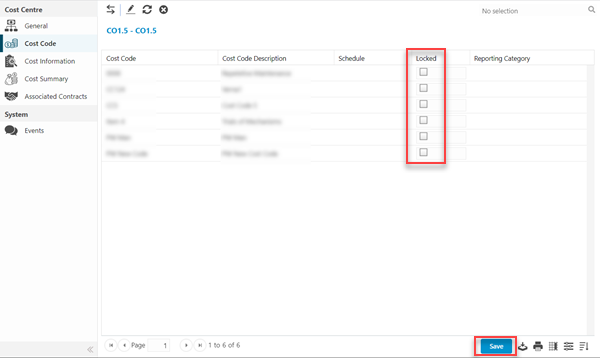
Settings > Finance > Cost Centres
The link will open the Cost Centre/ Cost Code grid, it is a grid that can be sorted and customised as normal.
To assign Cost Codes click Assign  , entities in the right hand assignment window are connected.
Available from 6.1.0.0
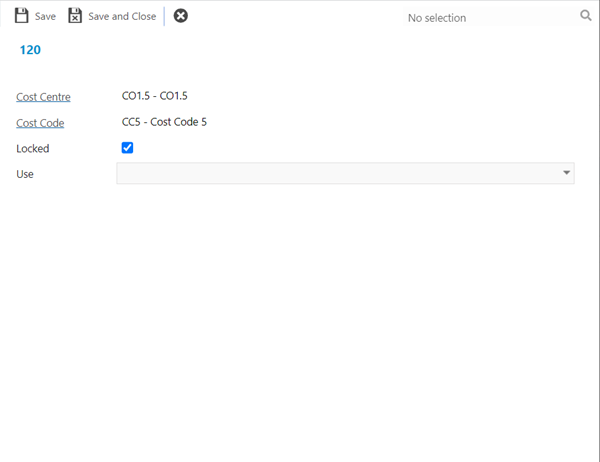
Open a record in the grid to update the Locked check-box or set the specific Use value(s) for the Cost Code within the current Cost Centre.
Select the relevant values the Cost Code is expected to be used for in relation to the current Cost Centre:
-
Expenditure
-
Department Recharge
To create Cost Codes see Cost Codes.
Cost Information
Click to view more detail.
Budgets may be defined for each Cost Code. When Tasks, Purchase Orders, Stock Costs or Room Bookings are charged against Cost Centres / Cost Codes the value is automatically deducted from the budget amount.
Settings > Finance > Cost Centres
From the drop down select the Year and Period.
Enter a budget for each Cost Code.
Accounting Periods must be set up to enable defining Budgets. See Accounting Preferences and Accounting Periods.
Cost Summary
Click to view more detail.
A Cost Summary is a summary of how much of the budget has been allocated or spent per Cost Code. It can be seen at any time by clicking the Cost Summary option in the Cost Centre window
Settings > Finance > Cost Centres
In the Cost Summary window details of spend against budget can be seen by clicking the Details button for each Cost Code.
Associated Contracts
Click to view more detail.
In MRI Evolution, Cost Centres have to be made visible to Contracts before they can be used on the Helpdesk or to create PPMs. Cost Centres can be assigned to Contracts from the Contract itself, however the reverse can also be done from the Cost Centre.
Settings > Finance > Cost Centres
The link will open the Cost Centre/ Contract grid, it is a grid that can be sorted and customised as normal.
To assign Contracts click Assign , entities in the right hand assignment window are connected.
To create a Contract see Contracts