Sales Receipts
The Sales Receipts feature in MRI Evolution enables organizations to record and manage payments received from clients. Payments are logged and then applied to the appropriate invoices, supporting accurate financial tracking and reconciliation.
Administrators can maintain the list of Sales Receipts here, ensuring all client payments are properly documented and linked to their corresponding invoices.
Modules > Sales Invoicing > Sales Receipts
The link will open the Sales Receipts grid. It is a grid view which can be searched, sorted and customised as normal.
To add a new Sales Receipts click New  , to edit an existing Sales Receipts click Edit
  . A pop up window will appear which will allow the creation or amendment of a Sales Receipts.
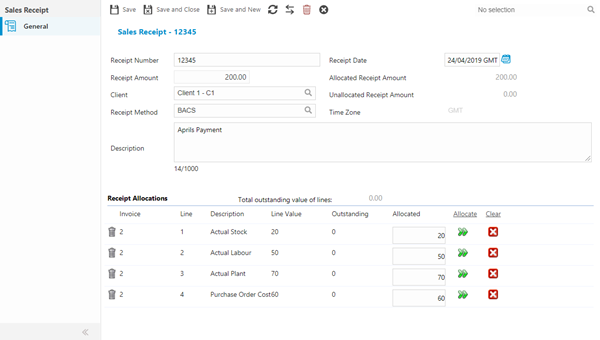
| Field Name |
Description |
| Receipt Number |
A unique sequential identifier automatically assigned by the system when recording a payment received from a client (e.g., RCP-2024-00123, R-4567). This system-generated reference provides an audit trail for all financial transactions and is used throughout the application to track payment allocations, reconcile bank deposits, and cross-reference with client invoices. The receipt number appears on payment confirmations sent to clients, bank reconciliation reports, and financial audit documentation. Cannot be manually edited once generated to maintain financial control and traceability. |
| Receipt Date |
The calendar date when payment was physically or electronically received from the client (format: DD/MM/YYYY or MM/DD/YYYY depending on regional settings). This date may differ from the invoice date, the bank processing date, or the date when the receipt is recorded in the system. Critical for cash flow reporting, aging analysis of receivables, and calculating days sales outstanding (DSO). The receipt date determines which accounting period the payment is recognized in and affects month-end financial reporting. Used in bank reconciliation to match against statement dates and in client account histories to track payment timeliness. |
| Receipt Amount |
The total monetary value of payment received from the client in the transaction currency (e.g., £1,250.00, $2,450.50). This gross amount represents the full payment received before allocation to specific invoices or line items. The receipt amount is then distributed across outstanding invoices using the allocation grid below, with any remaining unallocated funds held as payments on account or available for future invoice settlement. Essential for bank reconciliation (matching against bank statement deposits), cash flow tracking, and client account balance management. The system tracks allocated versus unallocated portions to ensure full payment accountability. |
| Allocated Receipt Amount |
The amount of the receipt that has currently been allocated to line items. |
| Client |
From the drop down select the Client the funds have been received from - for more information see Clients. |
| Unallocated Receipt Amount |
Auto-calculated from any funds on the receipt that have not yet been allocated. |
| Receipt Method |
From the drop down select the Receipt Method - for more information see Sales Receipt Methods. |
| Description |
The description of the receipt. |
Complete the fields and click Save  .
.
Line items then need to be assigned to the Sales Receipt to show what the Client has paid for.
To assign Sales invoice Line Items click Assign  , entities in the right hand assignment window are connected.
Once the Line items have been assigned the credit can be allocated. Enter the receipt amounts in the Allocated fields. Click Allocate Outstanding Amount  to allocate the whole balance of the line.
Complete the fields and click Save and Close  .
.
 Click to view - Sales Receipt Fields and Descriptions