Visitor Management
Visitor Management helps you track and manage all guests entering your buildings in Evolution. You can record visitor details, mark arrivals and departures, and produce visitor badges for security and compliance.
This feature integrates with room bookings and other modules, allowing you to streamline visitor check-in, ensure accurate records, and maintain a safe environment for staff and guests.
Modules > Visitor Management > Visitor Management
The link will open the Visitor Management grid. It is a grid view which can be searched, sorted and customised as normal.
If the Visitor has been added via a room booking, the following fields may be auto-populated: Building, Name, Email, Expected and Host Name.
To add a new Visitor click New  , to edit an existing Visitor click Edit
  . A pop up window will appear which will allow the creation or amendment of a Visitor.
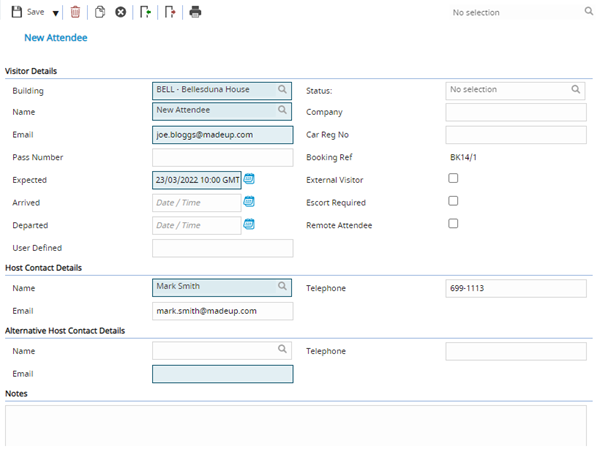
 Click to view - Visitor Management Fields and Descriptions
 Available from 7.0.0.0
Complete the fields and click Save  . Once the Visitor header has been completed and saved new icons will appear to allow Visitors to be quickly marked as arrived or departed.
Additional Visitor Management Icons
| Icon | Feature | Description |
|---|---|---|

|
Set as Arrived | Mark the Visitor as arrived. |

|
Set as Departed | Mark the Visitor as departed. |

|
Print Visitor Badge | Print the Visitors badge. |
Complete the fields and click Save and Close  .
.