Asbestos Surveys
Available from 6.5.0.0
The Asbestos Surveys feature in MRI Evolution enables organizations to document and manage asbestos survey records in a structured, consistent manner. Users can specify codes and survey types for each entry, supporting compliance, risk management, and effective data collection for asbestos-related processes.
Modules
The link will open the Asbestos Survey grid. It is a grid view which can be searched, sorted and customised as normal.
To add a new Asbestos Survey click New  , to edit an existing Asbestos Survey click Edit
  . A pop up window will appear which will allow the creation or amendment of an Asbestos Survey.
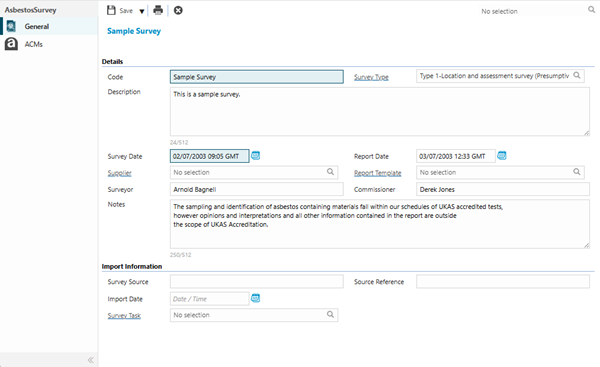
 Click to view - Asbestos Survey Fields and Descriptions
| Field Name | Description |
|---|---|
| Details | |
| Code | The identifying reference code of the Asbestos Survey. |
| Survey Type | From the drop down select the relevant Survey Type. |
| Description | Enter an appropriate description for the Asbestos Survey. |
| Survey Date | Mandatory field that contains the date and time the Survey is to take place, or has taken place. |
| Report Date | Enter the date that the Asbestos report was completed. |
| Supplier | If the Survey is to be undertaken by an external surveyor, select the relevant Supplier from the drop down. |
| Report Template | Select an appropriate Asbestos report from the drop down. |
| Surveyor | Free type field to contain the name of the person carrying out the Survey. |
| Commissioner | Free type field to contain the name of the individual or entity that has been tasked with commissioning and managing Asbestos Surveys. |
| Notes | Free type field to contain any additional information relevant to the Survey. |
| Import Information | |
| Survey Source | Enter the source of where the completed Survey information originated from. |
| Source Reference | Enter the external identifying reference for the Survey. |
| Import Date | The date the Survey information was imported to MRI Evolution. |
| Survey Task | The Survey can be associated with an MRI Evolution Task. |
Complete the fields and click Save  .
.
Once the Asbestos Survey details have been completed and saved:
-
an Import Survey Results toolbar button is enabled, allowing users to add a Survey document that's been completed by a third party company, to the Survey
-
an Asbestos Containing Materials (ACMs) sub navigation will appear
ACMs
Click to view more detail.
The ACMs sub navigation contains a grid of the Asbestos Containing Materials found as part of carrying out the current Asbestos Survey.
Asbestos Containing Material refers to any product or debris that contains asbestos fibres.
Modules
The link will open the ACMs grid.
Asbestos Containing Material records can be opened and edited from the grid.