Asbestos Register
Comprehensive record of known or suspected Asbestos Containing Materials across facilities. Tracks ACM survey results, risk assessments, material and priority scoring, and supports regulatory compliance through document attachment, event linking, and auditable reporting capabilities.
Facilities > Asbestos Register
The link will open the Asbestos Register grid. It is a grid view which can be searched, sorted and customised as normal.
Grid Details
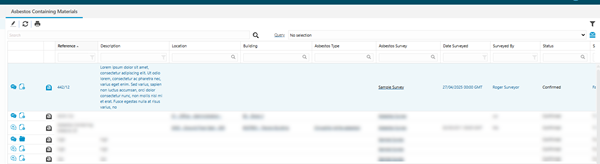
 Click to view more detail
| Grid Icons | Feature | Description |
|---|---|---|
 / /  |
View / Add Events | Left clicking on the icon will produce a pop up window showing Events, there is also a hyper-link within the pop up window to add Events. |
 / /  |
View / Add Documents | Left clicking on the icon will produce a pop up window showing attached Documents, there is also a hyper-link within the pop up window to add Documents. |

|
View / Edit ACM | Left clicking on the icon will open the Asbestos Containing Material record. |

|
Material Score |
Visual indicators to display the calculated Asbestos Material Score values directly in the grid:
|
|
|
Priority Score |
Visual indicators to display the calculated Asbestos Priority Score values directly in the grid:
|
|
|
Risk Score |
Visual indicators to display the calculated Asbestos Risk Score values directly in the grid:
|


Click the New  toolbar button. A pop up window will appear, allowing the addition of an Asbestos Containing Material record.
To edit an existing Asbestos Containing Material highlight the record in the grid and click Edit .
.
Select a record in the grid and click the Report  toolbar button to open the ACM-001 Asbestos Containing Materials report for the selected record.
Asbestos Containing materials Input Panel Tabs
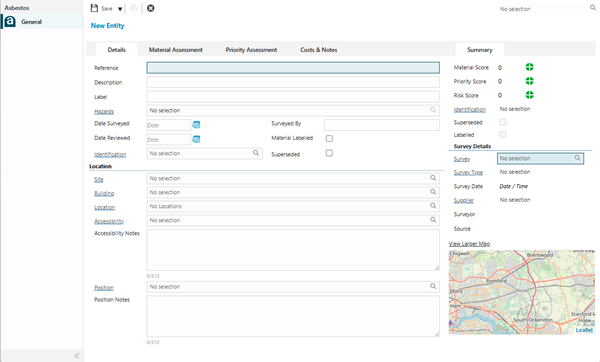
Click to view - Details Tab Fields and Descriptions
 Available from 7.0.0.0
Click to view - Material Assessment Tab Fields and Descriptions
Click to view - Priority Assessment Fields and Descriptions
Click to view - Costs & Notes Fields and Descriptions
Complete the fields and click Save  .
.
Click the Report toolbar button to open the ACM-001 Asbestos Containing Materials report for the current record.
The State of the ACM record can be changed by clicking the Status  button group and selecting an appropriate value from the following options:
-
Presumed
-
Confirmed
-
Not Present
-
Removed
-
History
The user will be presented with a pop-up to add comments and these will be added to a State Change Event against the ACM record.
Summary Side Panel
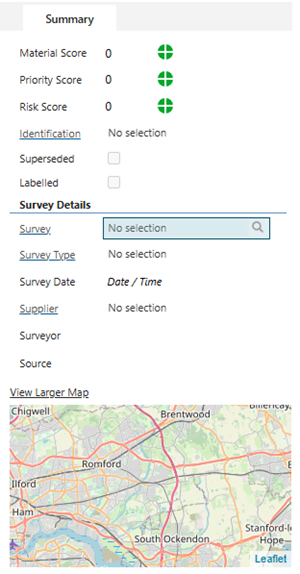
Click to view more detail.
| Field | Description |
|---|---|
| Material Score |
Read only field to display the calculated Material Score value:
|
| Priority Score |
Read only field to display the calculated Priority Score value:
|
| Risk Score |
Read only field to display the calculated Risk Assessment Score value:
|
| Identification | Read only field containing the selected Identification Level in the Details tab. |
| Superseded | Read only check-box with the same value as the Superseded field in the Details tab. |
| Labelled | Read only check-box with the same value as the Labelled field in the Details tab. |
| Survey Details | |
| Survey | Select the appropriate Asbestos Survey for the ACM from the drop-down. |
| Survey Type | Read only field that is auto-populated with the value defined against the selected Asbestos Survey above. |
| Survey Date | Read only field that is auto-populated with the value defined against the selected Asbestos Survey above. |
| Supplier | Read only field that is auto-populated with the value defined against the selected Asbestos Survey above. |
| Surveyor | Read only field that is auto-populated with the value defined against the selected Asbestos Survey above. |
| Source | Read only field that is auto-populated with the value defined against the selected Asbestos Survey above. |