Asset Tags
Asset Tags provide the second-level classification beneath Asset System for organizing assets into functional groups (for example, within HVAC system: Air Handling, Boilers, Chillers; within Electrical system: Lighting, Distribution, Emergency Power). Define tag codes (for example, "AHU", "BOIL", "CHILL") and descriptions to establish hierarchical grouping that reflects how equipment is organized physically or operationally. When creating an asset, select the Asset System first (for example, HVAC), then choose the relevant Tag (for example, Boilers), enabling reports and work planning filtered by equipment type. Link Asset Tags to Associated Contracts to restrict which maintenance contracts can work on specific equipment groups—for example, assign your "Boilers" tag to the heating specialist contract, ensuring only authorized contractors are scheduled for boiler maintenance tasks. This classification supports targeted PPM schedules (for example, all chillers serviced quarterly), spending analysis by equipment type (for example, total electrical system maintenance costs), and compliance tracking (for example, gas safety checks for all boiler assets).
Settings > Assets > Asset Tags
The link will open the Asset Tag grid. It is a grid view which can be searched, sorted and customised as normal.
To add a new Asset Tag click New  , to edit an existing Asset Tag click Edit
  . A pop up window will appear which will allow the creation or amendment of an Asset Tag.
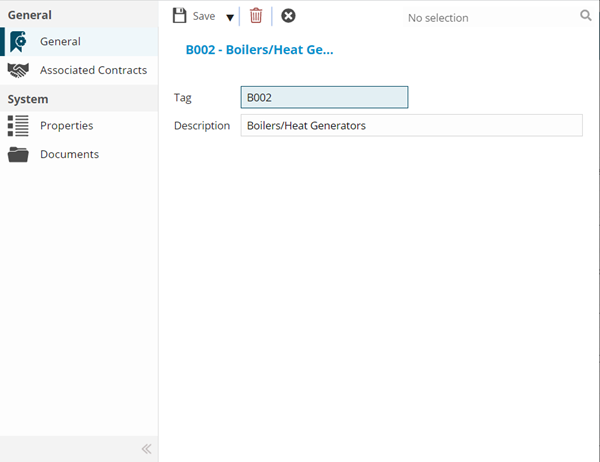
 Click to view - Asset Tag Fields and Descriptions
| Field Name | Description |
|---|---|
| Tag | The code of the Asset Tag. |
| Description | The description of the Asset Tag. |
Complete the fields and click Save  . Once the Asset Tag header has been completed and saved a sub navigation will appear to allow additional entities to be assigned.
These include:
- Associated Contracts
Associated Contracts Sub Navigation
Click to view more detail.
Once an Asset Tag has been created it must be assigned to the relevant Contracts. This ensures that only certain Contracts can work with certain groups of Assets.
Settings > Assets > Asset Tags
The link will open the Asset Tag / Contract Grid. It is a Grid view that can be customised and sorted as normal.
To assign Contracts click Assign , entities in the right hand assignment window are connected.
To create Contracts see Contracts.
Complete the fields and click Save and Close  .
.