Attribute Groups
Available from 4.4.0.0
Attribute Groups organize related custom attributes into logical collections that can be assigned to entities.
Create groups with names and descriptions, populate them with attributes from the Attribute Library, and map groups to entities such as assets, locations, tasks, or contacts. Groups structure attribute presentation and simplify data entry.
 Available from 7.0.0.0
The Purchase Key licence dependency for this specific element of the system has been removed and is now included as standard in the core MRI Evolution product the feature has been turned on for all systems by default.
Note: Other restrictions, such as User licence type restrictions and / or any restrictions to underlying functionality that is dependent upon Purchase Key licences will remain in place.
Settings > Attributes > Attribute Groups
The link will open the Attribute Groups grid. It is a grid view which can be searched, sorted and customised as normal.
To add a new Attribute Group click New  , to edit an existing Attribute Group click Edit
  . A pop up window will appear which will allow the creation or amendment of a Attribute Group.
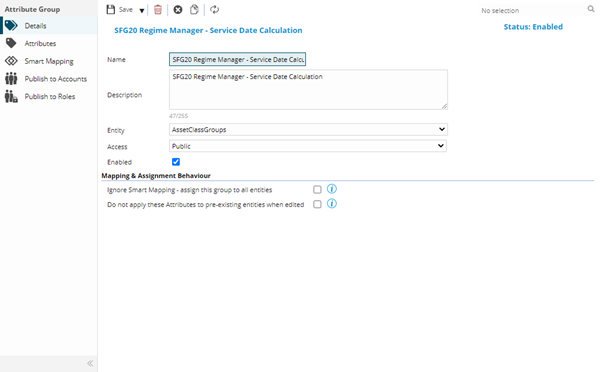
To enable Attributes to be stored against an entity "Store Attributes" must be checked against the entities Table Register.
 Click to view - Attribute Groups Fields and Descriptions
| Field Name | Description |
|---|---|
| Name | The name of the Attribute Group. |
| Description | The description of the Attribute Group. |
| Entity | From the drop down select the entity the Attribute Group will be connected to. |
| Access |
From the drop down select either:
The choice here will be used to determine whether this Attribute Group is restricted by publishing or visible to all |
| Enable | Check the box to enable the Attribute Group. |
| Ignore Smart mapping - Assign this group to all Entities | Check the box to apply this Attribute Group to all instances of the connected entity type. |
| Do not apply these Attributes to pre-existing entities when edited | Check the box to ensure that this Attribute Group is not added to existing entities when they are edited. |
Complete the fields and click Save  . Once the Attribute Group header has been completed and saved a sub navigation will appear to allow additional entities to be assigned.
These include:
- Attributes
- Smart Mapping
- Publish to Accounts
- Publish to Roles
Attributes Sub Navigation
Click to view more detail.
Once the Header has been created Attributes can be assigned and Smart Mapping can be applied.
Settings > Attributes > Attribute Groups
The link will open the Attribute Groups / Attributes grid. It is a grid view that can be customised and sorted as normal.
To assign Attributes click Assign  , entities in the right hand assignment window are connected.
Once Attributes have been assigned the order of the attributes can be altered by using Move Up  and Move Down
  .
.
Available from 4.4.5 To ensure that all entities mapped to the Attribute Group have the same Attributes click Attribute Group click Re-sync  this will update any additional Attributes that have been added or removed to / from the group.
Smart Mapping Sub Navigation
Click to view more detail.
Once the Attributes have been assigned to the Attribute Group Header the Group can be Smart Mapped.
Settings > Attributes > Attribute Groups
Fields must first be assigned to enable values to be assigned. Fields will only show here if they are Lookups for the entity type selected on the Attribute Group Header. To assign fields click Assign , entities in the right hand assignment window are connected.
Once the fields have been assigned , individual values can be defined, click Assign Values  , entities in the right hand assignment window are connected.
If new entities are now created that meet the criteria of the Attribute Group, the groups attributes will automatically be applied.
Clicking Apply Attributes to existing entities  will apply the current Attributes to all existing entities that match the mapping criteria.
NOTE: Attributes and Mapping rules should be assigned prior to clicking Apply Attributes to existing entities to ensure correct entities are mapped.
NOTE: This will not remove Attributes Groups that have already been smart mapped to the entity - these can be removed manually if required.
Complete the fields and click Save and Close  .
.
Publish To Accounts Sub Navigation
Click to view more detail.
Available from 4.8.0.0
Once the Header has been created the assignment of Accounts to the current Attribute Group can occur.
Settings > Attributes > Attribute Groups
The link will open the Accounts / Attributes grid. It is a grid view that can be customised and sorted as normal.
To assign Accounts click Assign , entities in the right hand assignment window are connected.
Publish To Roles Sub Navigation
Click to view more detail.
Available from 4.8.0.0
Once the Header has been created the assignment of Roles to the current Attribute Group can occur.
Settings > Attributes > Attribute Groups
The link will open the Roles / Attributes grid. It is a grid view that can be customised and sorted as normal.
To assign Roles click Assign , entities in the right hand assignment window are connected.