Attribute Lookups
Available from 4.4.0.0
Attribute Lookups create controlled drop down lists and predefined value sets that standardize data entry across custom attributes (for example, Equipment Condition: Excellent, Good, Fair, Poor; Safety Rating: Low, Medium, High, Critical; Compliance Status: Compliant, Non-Compliant, Under Review). Create a lookup by naming it descriptively (for example, "Asset Condition Scale"), then add each allowed value with a numerical sequence (1, 2, 3) and display name—mark one value as the default. When you assign this lookup to a custom attribute in the Attribute Library, users see a drop down menu with only the predefined options rather than a free-text field, preventing inconsistent entries like "Good," "Okay," "Fine," or "Acceptable" that make reporting impossible. For example, create an "Asset Condition Scale" lookup, assign it to a "Current Condition" attribute for Assets, and users can only select from your standardized values when inspecting equipment. This ensures uniform data quality, enables meaningful trend analysis (for example, percentage of assets in "Poor" condition), supports filtering and reporting (for example, show all assets rated "Critical" for safety), and reduces training time since users select from clear options rather than memorizing organizational terminology.
 Available from 7.0.0.0
The Purchase Key licence dependency for this specific element of the system has been removed and is now included as standard in the core MRI Evolution product the feature has been turned on for all systems by default.
Note: Other restrictions, such as User licence type restrictions and / or any restrictions to underlying functionality that is dependent upon Purchase Key licences will remain in place.
Settings > Attributes > Attribute Lookups
The link will open the Attribute Lookups grid. It is a grid view which can be searched, sorted and customised as normal.
To add a new Attribute Lookup click New  , to edit an existing Attribute Lookup click Edit
  . A pop up window will appear which will allow the creation or amendment of a Attribute Lookup.
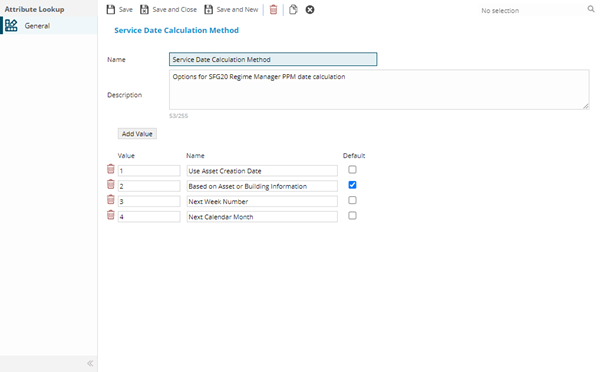
 Click to view - Attribute Lookups Fields and Descriptions
Complete the fields and click Save and Close  .
.