Contract Group
Define organizational contract hierarchies within MRI Evolution contract management framework. Contract Groups provide mandatory organizational structure reflecting business divisions, enabling logical grouping, access control, and reporting capabilities while ensuring users can only access contracts within their assigned groups.
Settings > Contracts > Contract Groups
The link will open the Contract Group grid, a User will only be able to see Contract Groups in this grid that they are assigned to. It is a grid view which can be searched, sorted and customised as normal.
To add a new Contract Group click New  , to edit an existing Contract Group click Edit
  . A pop up window will appear which will allow the creation or amendment of a Contract Group.
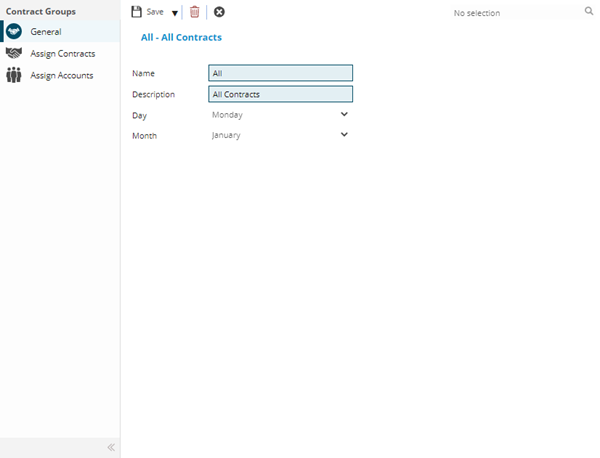
 Click to view - Contract Group Fields and Descriptions
Complete the fields and click Save  . Once the Contract Group header has been completed and saved a sub navigation will appear to allow additional entities to be assigned.
These include:
- Assign Contracts
- Assign Accounts
Assign Contracts
Click to view more detail.
Once a Contract Group Header has been created, Contracts can be assigned to the group.
Settings > Contracts > Contract Groups
The link will open the Contract Group / Contracts grid. It is a grid view that can be customised and sorted as normal.
To assign Contracts click Assign  , entities in the right hand assignment window are connected.
To create Contracts see Contracts
Assign Accounts
Click to view more detail.
Once a Contract Group Header has been created User Accounts can be assigned to the group
Settings > Contracts > Contract Groups
The link will open the Contract Group / Accounts grid. It is a grid view that can be customised and sorted as normal.
To assign Accounts click Assign , entities in the right hand assignment window are connected.
To create Accounts see User Accounts.