PMS Ratchets
Available from 4.4.1.0
PMS Ratchets automatically increase penalties when repeated or extensive failures occur in Payment Mechanism contracts. Link Ratchets to Tasks or failed periods to escalate charges when failures exceed thresholds, such as multiple failures in one location or uncompleted tasks across batches.
Settings > Payment Mechanisms > PMS Ratchets
The link will open the PMS Ratchets grid. It is a grid view which can be searched, sorted and customised as normal.
To add a new PMS Ratchet click New  , to edit an existing PMS Ratchet click Edit
  . A pop up window will appear which will allow the creation or amendment of a PMS Ratchet.
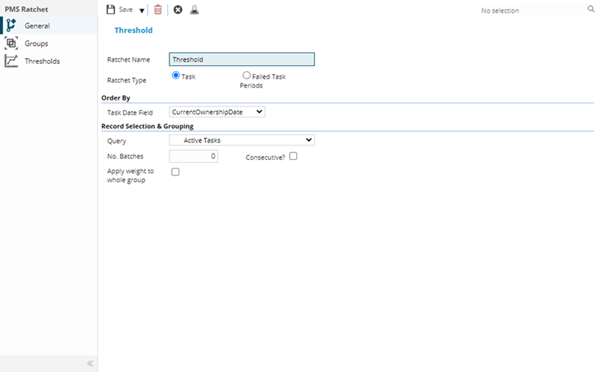
 Click to view - PMS Ratchets Fields and Descriptions
Complete the fields and click Save  . Once the PMS Ratchets header has been completed and saved a sub navigation will appear to allow additional entities to be created / assigned.
These include:
- Groups
- Thresholds
Groups
Click to view more detail.
A Ratchet must be attached to a Group e.g. a Location, this can then be used to define if a Task has occurred numerous times in a specific Location.
Settings > Payment Mechanisms > PMS Ratchets
The link will open the PMS Ratchets / Groups grid. It is a grid view that can be customised and sorted as normal.
To add a new Group click New , to edit an existing Group click Edit . A pop up window will appear which will allow the creation or amendment of a Group.
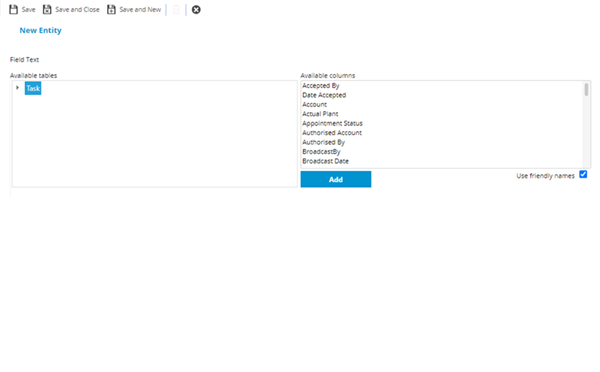
Select the Table and field to group the Ratchet by and click Save and Close  .
.
Thresholds
Click to view more detail.
If a threshold is being used it must be applied and defined to the Ratchet
Settings > Payment Mechanisms > PMS Ratchets
The link will open the PMS Ratchets / Thresholds grid. It is a grid view that can be customised and sorted as normal.
To add a new Threshold click New , to edit an existing Threshold click Edit . A pop up window will appear which will allow the creation or amendment of a Threshold.
Click to view Thresholds Fields and Descriptions
PayMech Module results are calculated using Workflow. Unless the calculation workflows are amended, changing settings in MRI Evolution may have no effect on PayMech outputs and results .