Quote Review Criteria
Quote Review Criteria define approval routing rules that automatically direct quote requests to appropriate reviewers based on Cost Centre and Cost Code combinations. Create criteria by selecting a Cost Centre (for example, Building Maintenance, IT Services) and Cost Code (for example, Reactive Repairs, Equipment Upgrades), then assign Accounts or Roles as reviewers for that financial combination. When a quote request matches the configured criteria, the system automatically routes it to the assigned reviewers for approval, ensuring proper authorization before procurement. For example, configure criteria for Cost Centre "Building A Operations" and Cost Code "HVAC Repairs" with the Facilities Manager as reviewer—any HVAC repair quotes for Building A automatically require Facilities Manager approval. This enforces financial controls (budget holders approve their own expenditures), maintains authorization hierarchies (senior approvers for high-value categories), and ensures compliance with procurement policies. Organizations typically configure criteria covering all active Cost Centre/Code combinations used in quotes, assigning appropriate approval levels based on departmental structure and financial delegation limits.
Settings > Quotes > Quote Review Criteria
The link will open the Quote Review Criteria grid. It is a grid view which can be searched, sorted and customised as normal.
To add a new Quote Review Criteria click New  , to edit an existing Quote Review Criteria click Edit
  . A pop up window will appear which will allow the creation or amendment of a Quote Review Criteria.
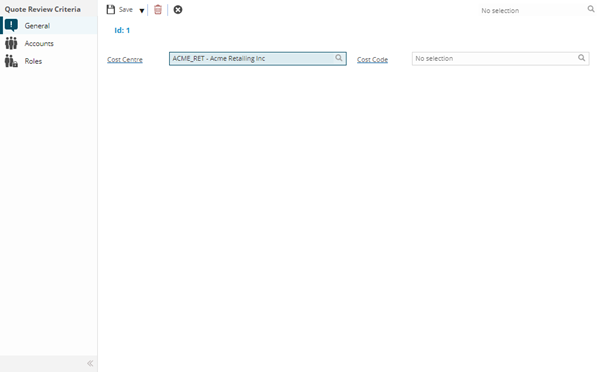
 Click to view - Quote Review Criteria Fields and Descriptions
Complete the fields and click Save  . Once the Quote Review Criteria header has been completed and saved a sub navigation will appear to allow additional entities to be assigned.
These include:
- Accounts
- Roles
Accounts Sub Navigation
Click to view more detail.
Once the Quote Review Criteria header has been completed, the Accounts or Roles to undertake the review must be assigned.
Settings > Quotes > Quote Review Criteria
The link will open the Quote Review Criteria / Accounts grid. It is a grid view that can be customised and sorted as normal.
To assign Accounts click Assign  , entities in the right hand assignment window are connected.
Roles Sub Navigation
Click to view more detail.
Once the Quote Review Criteria header has been completed, the Accounts or Roles to undertake the review must be assigned.
Settings > Quotes > Quote Review Criteria
The link will open the Quote Review Criteria / Roles grid. It is a grid view that can be customised and sorted as normal.
To assign Roles click Assign , entities in the right hand assignment window are connected.