Calendar Days
Purpose. Calendar Days define when appointment related activity can occur (e.g. working days for booking). Each record is a container that can later have one or more Calendar Sessions assigned to specify available time blocks.
Core components. A Calendar Day stores a name, description and flags that control whether it can be used for Appointments plus the valid weekdays. After saving, you can assign Calendar Sessions beneath it.
Typical actions.
- Create a Calendar Day for a new service or location you want to make bookable.
- Enable or disable appointment usage to quickly include/exclude a day from requests.
- Select weekdays that appointments may be booked (e.g. Mon–Fri only).
- Assign Calendar Sessions to define hourly availability once the header is saved.
- Adjust description to clarify booking purpose for administrators.
Outcomes & value. Clear Calendar Day definitions make downstream session assignment and booking rules predictable, reduce scheduling errors, and simplify maintenance of working vs non-working days.
Settings > SLA Settings > Calendar Days or
Settings > Appointments & Visits > Calendar Days
The link will open the Calendar Days grid. It is a grid view which can be searched, sorted and customised as normal.
To add a new Calendar Day click New  , to edit an existing Calendar Day click Edit
  . A pop up window will appear which will allow the creation or amendment of a Calendar Day.
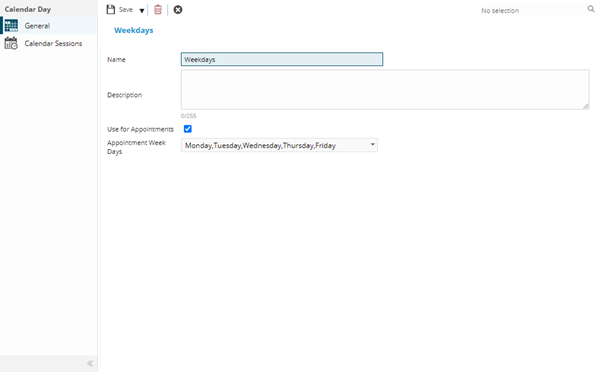
 Click to view - Calender Days Fields and Descriptions
Complete the fields and click Save  . Once the Calendar Days header has been completed and saved a sub navigation will appear to allow additional entities to be assigned.
These include:
- Calendar Sessions
Calendar Sessions Sub Navigation
Click to view more detail.
Once a Calendar Day has been created Calendar Sessions can be assigned to it.
Settings > Service Level Agreements > Calender Days
The link will open the Calendar Days / Calendar Sessions grid. It is a grid view that can be customised and sorted as normal.
To assign Calendar Sessions click Assign  , entities in the right hand assignment window are connected.
To create Calendar Sessions see Calender Sessions