Work & Access Survey page
Available from 5.5.0.0
View completed Work & Access Survey responses from the Survey Responses tab in Surveys sub-navigation pages (Sites, Buildings, Locations, Instruction Sets, Hazard/Alert Types, Permit Classes, Helpdesk).
Click View Response button to see answers; use State toolbar to change response status.
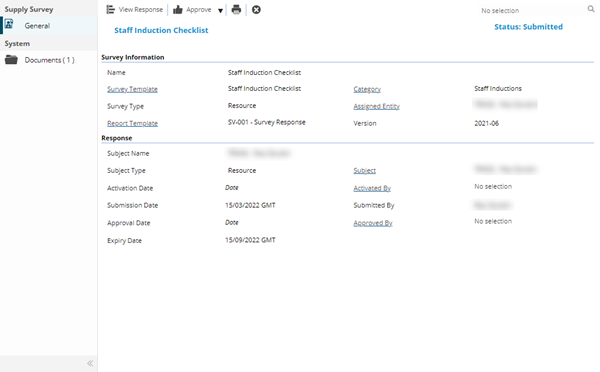
 Click to view - Supply Survey Template Fields and Descriptions
| Field Name | Description |
|---|---|
| Survey Information | |
| Name | The Name of the Survey Response |
| Survey Template |
The Name of the Survey Template related to the Survey Response The field label is a hyper-link that will open the Survey Template record when clicked |
| Category |
The Survey Category of the Survey Template related to the Survey Response The field label is a hyper-link that will open the Survey Category record when clicked |
| Survey Type |
The Survey Type of the Survey Template related to the Survey Response. This will be one of the following Work Survey enabled entities:
|
| Assigned Entity |
The 'thing' that has been assigned to the Survey Template related to the Survey Response, such as a specific Building or Location The field label is a hyper-link that will open the Assigned Entity record when clicked |
| Report Template |
The Report Template of the Survey Template related to the Survey Response The field label is a hyper-link that will open the Report's input panel when clicked The system standard template is SV-001 |
| Version | The version number of the Survey Template related to the Survey Response |
| Response | |
| Subject Name |
The name of the person providing the Survey Response |
| Subject Type |
The system entity of the Subject related to the Survey Response, one of the following:
|
| Subject |
The person providing to the Survey Response The field label is a hyper-link that will open the Subject record when clicked |
| Activation Date |
The date the Survey Response status was set to Active |
| Activated By |
The user that set the Survey Response status to Active The field label is a hyper-link that will open the User record when clicked |
| Submission Date |
The date the Survey Response status was set to Submitted |
| Submitted By |
The user that set the Survey Response status to Submitted |
| Approval Date |
The date the Survey Response status was set to Approved |
| Approved By |
The user that set the Survey Response status to Approved The field label is a hyper-link that will open the User record when clicked |
| Expiry Date |
The date the Survey Response status was set to Expired |
| Task Id |
The Task Id that the Survey Response relates to The field label is a hyper-link that will open the Task record when clicked |
| Time Record Id |
The Time Record that the Survey Response relates to The field label is a hyper-link that will open the Time Record when clicked |