Work & Access Survey Templates
Available from 5.5.0.0
Survey templates controlling safety and compliance requirements for site access and task execution. Attached to Sites, Buildings, Locations, Instruction Sets, Hazard Types, and Permit Classes to enforce mandatory survey completion at key workflow stages.
Enforces requirements at assignment, mobile check-in, completion, and history stages across Evolution, Evolution Go, Connect, and Contractor systems. Prevents assignment or completion until required surveys are answered.
- Assignment ( MRI Evolution, Evolution Connect and Contractor Gateway)
- It is possible to configure the system so that an individual Resource cannot be assigned unless they have completed a valid response to the required survey
- It is possible to configure the system so that a Task cannot be assigned unless someone has completed a valid response to the required survey
- Mobile and Contractor ( Evolution Go and Contractor Kiosk/Relay)
- It is possible to define the point in the Evolution Go Tasks activity that a resource would be expected to complete a survey for a Task
- It is possible to define the point in the Contractor Gateway and Contractor Kiosk that a user would be expected to complete a survey for a Task
- Completion ( MRI Evolution and Evolution Connect)
- It is possible to configure the system so that a Task cannot be marked as Completed unless someone has submitted a valid response to the required survey
- Send to History ( MRI Evolution and Evolution Connect)
- It is possible to configure the system so that a Task cannot be sent to History unless someone has submitted a valid response to the required survey
Access Surveys can be added to the following entities:
- Sites
- Buildings
- Locations
Work Surveys can be added to the following entities
- Work Permit Classes
- Hazard / Alert Types
- Contracts
- Instruction Sets
Along with Supply Chain Survey Templates they have replaced the Survey Templates functionality, added in the 5.3.0.0 release.
The Template must be saved before the survey designer can be opened to add questions to the survey and survey detail, such as entity assignments can be created.
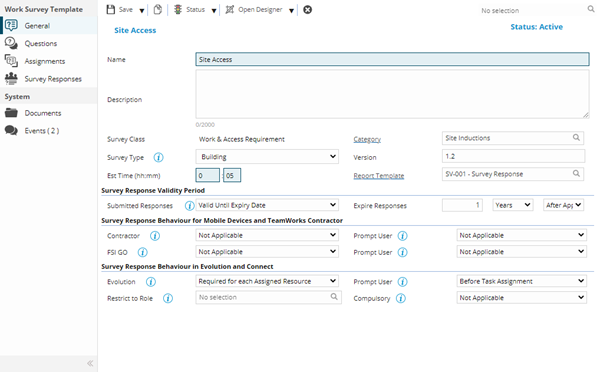
The list of Survey Templates are maintained here.
Settings > Surveys > Work & Access Survey Templates
The link will open the Work & Access Survey Template grid. It is a grid view which can be searched, sorted and customised as normal.
To add a new Work & Access Survey Template click New  , to edit an existing Work & Access Survey Template click Edit
  . A pop up window will appear which will allow the creation or amendment of a Work & Access Survey Template.
 Click to view - Work Survey Template Fields and Descriptions
Complete the fields and click Save  . Once the Work Survey Template header has been completed and saved, toolbar buttons and sub navigation options will appear.
These include:
- Questions
- Assignments
- Survey Responses
Questions
Click to view more detail.
Available from 5.7.0.0
Once the Work Survey Template is created, Survey Questions can be created in the Survey Designer. The details of the created Questions will be displayed in the grid.
The Questions sub navigation will only be displayed once at least one Question has been defined in the Survey Designer.
Settings > Surveys > Work & Access Survey Templates
The link will open the Work Survey Templates / Questions grid. It is a grid view that can be customised and sorted as normal.
Assignments
Click to view more detail.
Once the Work Survey Template is created it can be assigned to the relevant entities of the selected Survey Type
Settings > Surveys > Work & Access Survey Templates
The link will open the Work Survey Templates / Assignments grid. It is a grid view that can be customised and sorted as normal.
To assign the Work Survey Template to entities click the Assign button to open the standard assignment window.
Survey Responses
Click to view more detail.
Available from 5.5.0.0
Once the Work Survey Template has been created, the Survey Responses sub navigation will become available. The grid will contain the completed Work Survey responses.
Settings > Surveys > Work & Access Survey Templates
The link will open the Survey Responses grid. It is a grid view that can be customised and sorted as normal.
A record must be selected in the Survey Responses grid in order to use the  View Response button.
Multiple rows cannot be selected. When a row is selected and the button is clicked a new window should be opened displaying the Survey Response.
Open Designer
Click to view more detail.
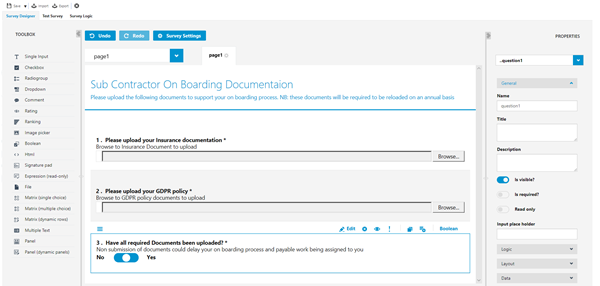
Use the Survey settings to create a title and the general description for the survey.
Use the Toolbox to create the questions, file uploads, drop downs, ratings etc..... to create the survey detail.
Available from 5.6.0.0
Matrix (single choice)
- Matrix (multiple choice)
- Matrix (dynamic choice)
- Panel (dynamic)
- Multiple Text
Available from 5.6.0.0
- Panels
- Expression (read-only)
- Comment
Available from 5.6.0.0
 and
and  toolbar buttons allow users to export the JSON file (containing the Questions and so on) from an existing Survey and import it to another Survey, thus saving time when creating multiple similar Surveys.
Once the Survey has been created click Save.
Activating the Survey
Click to view more detail.
A survey Template must be activated in order to be used for Task Requirements and so on.
Click Status , from the drop down select Activate
Survey Templates can be suspended or moved to history if no longer required.