Database
The Database feature in MRI Evolution allows organizations to manage the creation and configuration of system databases. Typically, this process is handled by MRI Software in collaboration with your database administrator, ensuring secure and reliable data storage for all application modules.
Administrators can maintain the list of Databases here, supporting robust data management and system integrity.
Settings > System Administration > Environment > Databases
The link will open the Database grid. It is a grid view which can be searched, sorted and customised as normal.
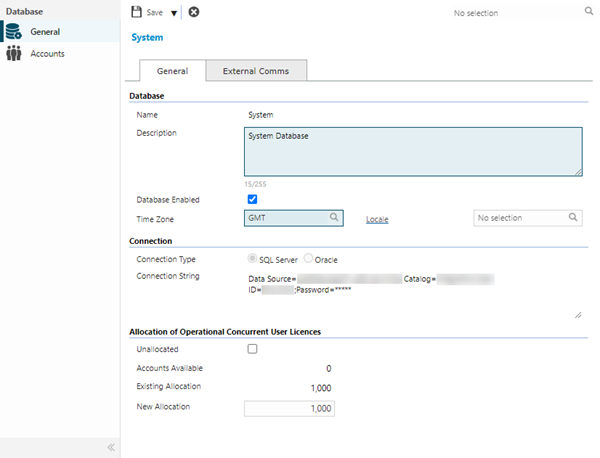
| Field Name |
Description |
| Database
|
| Name |
Enter the name by which the Database will be known. |
| Description |
Enter a description relevant to what the Database is intended, such as UAT Environment and so on. |
| Database Enabled |
Only enabled Databases perform data synchronisation. Run the MRI Evolution Data Transfer Tool on the Database after it is first attached and enabled. |
| Time Zone |
Select the appropriate Time Zone for the Database.
A Time Zone designated at the Database level is applicable to all records, unless overridden by a specific Time Zone applied to an Account, Building, Resource or Task.
|
| Locale |
Available from 6.0.1.0
Select the appropriate Locale for the Database.
|
| Connection
|
| Connection Type |
Select the relevant value for the Database:
|
| Connection String |
Enter the appropriate connection string for the Database and the Connection Type selected.
|
| Allocation of Operational Concurrent User Licences
|
| Unallocated |
In a multi-database environment it is possible to allocate Operational Concurrent licences on a Database by Database basis. Optionally check this box to disable the fields that define the allocation of licences, below.
 Available from 7.0.0.0 Available from 7.0.0.0
The licence restrictions related to the allocation of users has been removed. This functionality now forms part of the base MRI Evolution system.
|
| Accounts Available |
This is a read only calculated field. The number will be the sum of the number of Operational Concurrent licences bought by the client, minus the Existing Allocation figure.
This field will be hidden if the Unallocated check-box is checked.
|
| Existing Allocation |
This is a read only field and will only show a non-zero value if a New Allocation value has previously been set.
This field will be hidden if the Unallocated check-box is checked.
|
| New Allocation |
Enter a number of Operational Concurrent licences to allocate to the current Database.
The number entered cannot exceed the Accounts Available.
This field will be hidden if the Unallocated check-box is checked.
|
Available from 7.0.0.0
The Purchase Key licence dependency for this specific element of the system has been removed and is now included as standard in the core MRI Evolution product the feature has been turned on for all systems by default.
Note: Other restrictions, such as User licence type restrictions and / or any restrictions to underlying functionality that is dependent upon Purchase Key licences will remain in place.
| Field Name |
Description |
| External Communications
|
| Communications Endpoint |
Enter the AMQP endpoint path.
The value entered here must match the equivalent setting in the external system that's being integrated with MRI Evolution.
|
| Communications Username |
Enter the AMQP authenticated user's username. The value entered here must match the equivalent setting in the external system that's being integrated with MRI Evolution. |
| Communications Password |
Enter the AMQP authenticated user's password. The value entered here must match the equivalent setting in the external system that's being integrated with MRI Evolution. |
| Communications Virtual Host |
Enter the name of the AMQP Virtual Host. The value entered here must match the equivalent setting in the external system that's being integrated with MRI Evolution. |
| Communications Event |
Enter the path of the AMQP Event Exchange. The value entered here must match the equivalent setting in the external system that's being integrated with MRI Evolution. |
 Click to view - Database, General Tab Fields and Descriptions