Pages
Container layouts organizing multiple widgets into customizable dashboards across Evolution, Connect, and Reach platforms. Pages support various layout styles enabling widget reuse and tailored user interface designs.
Administrators configure page availability, widget arrangements, and display settings to deliver role-appropriate information access and functionality.
 Available from 7.0.0.0
The Purchase Key licence dependency for this specific element of the system has been removed and is now included as standard in the core MRI Evolution product the feature has been turned on for all systems by default.
Note: Other restrictions, such as User licence type restrictions and / or any restrictions to underlying functionality that is dependent upon Purchase Key licences will remain in place.
Settings > Widgets & Home Pages > Pages
The link will open the Pages grid. It is a grid view which can be searched, sorted and customised as normal.
To add a new Page click New  , to edit an existing Page click Edit
  . A pop up window will appear which will allow the creation or amendment of a Page.
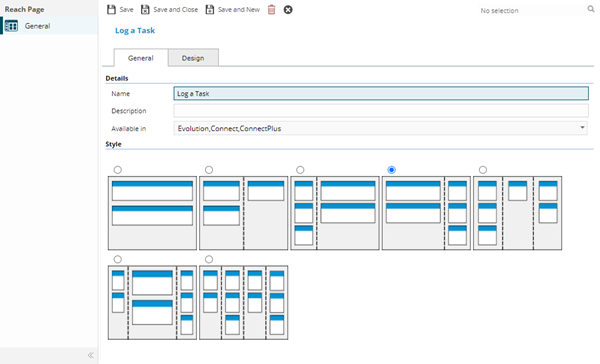
 Click to view - Pages Fields and Descriptions
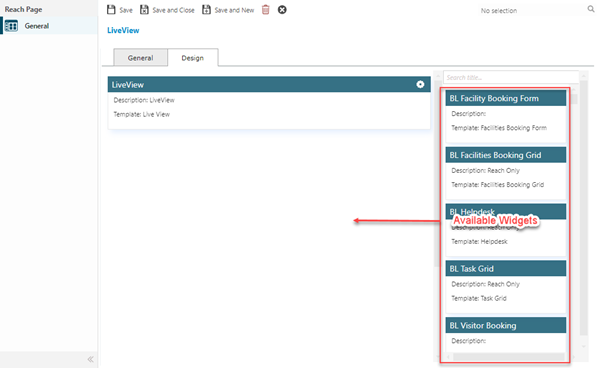
Open the Design Tab, drag the widget(s) from the list of Available Widgets into the required position on the page.
Available from 6.1.2.0
The placeholders for the Widgets on the page have been enhanced to include the user defined Description of the Widget and the Widget Template Type.
On each Widget click Configure  , set the display name (what is shown on the page in Evolution Reach) and set the height in pixels (overrides the default height of the widget)
Available from 6.2.0.0
The 'available widgets' column, highlighted above, has been updated to improve the usability as follows:
-
The widgets are now sorted by the Widget Name instead of the database Id value
-
A Search option has been added to filter the list
Complete the fields and click Save and Close  .
.