Widget - Supplier Quote Grid
Available from 4.4.8.0
Purpose. The Supplier Quote Grid widget shows current supplier quotations in a compact homepage panel so users can review and act without leaving their dashboard.
Core components. A widget instance stores its query (which quotes to show), display columns and user permissions. Actions (approve / reject or open full record) follow standard quote workflow.
Typical actions.
- Add the widget and assign a saved Query to filter quotes (e.g. Pending Approval).
- Open a quote for detailed comparison before deciding.
- Approve or reject directly from the widget to speed turnaround.
- Adjust displayed columns to show pricing or supplier identifiers.
- Refine the underlying Query to narrow or widen visibility as requirements change.
Outcomes & value. Quicker quote decisions, fewer navigation steps and a clearer view of outstanding procurement actions improve processing time and oversight.
Settings > Widgets & Home Pages > Widgets > Widget - Supplier Quote Grid
The link will open the Widgets grid. It is a grid view which can be searched, sorted and customised as normal.
To add a new Widget click New  , to edit an existing Widget click Edit
  . A pop up window will appear which will allow the creation or amendment of a Widget.
Select the Widget template : Supplier Quote Grid. Complete the fields and click Save  . Click Configure Widget
  .
.
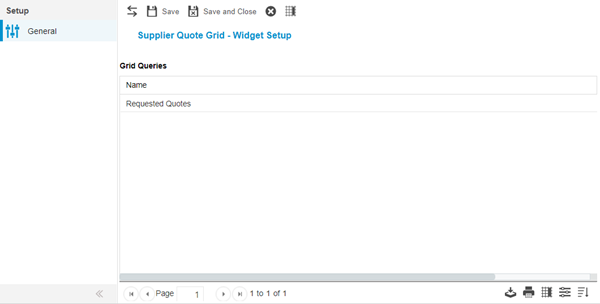
Queries must be assigned to the Supplier Quote Widget to dictate which quotes can be viewed. To assign Queries click Assign  , entities in the right hand assignment window are connected.
Additional Icons and Features
| Icon | Feature | Description |
|---|---|---|

|
Set Grid Columns | Set Default Columns for the Supplier Quote Widget |
Complete the fields and click Save and Close  .
.